Cubby: Consumer app and productivity landing page template for Next.js.
- Next.js 16
- CSS
- TypeScript
- 10 sections
- Light
- No API keys
- Palette
- Updated Oct 18, 2026
01Overview
At a glance
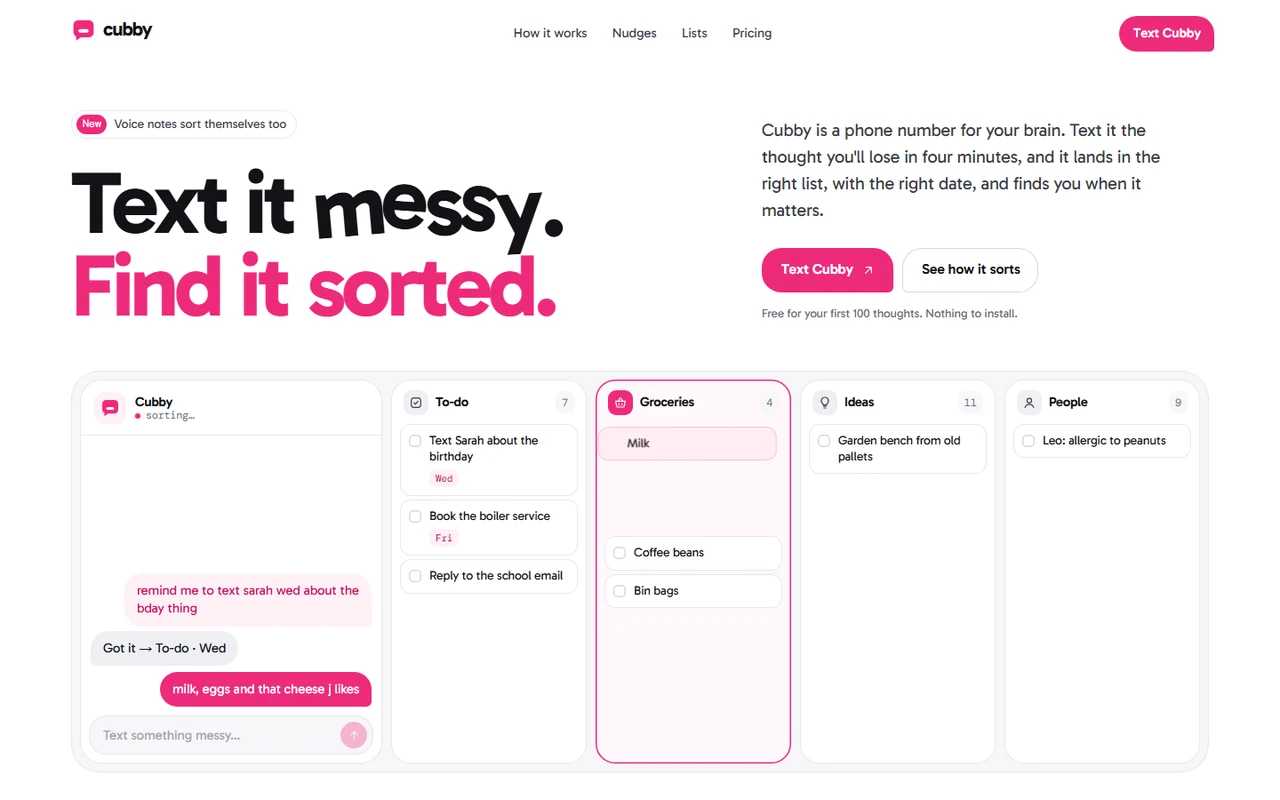
A complete launch page with original positioning: Cubby is a phone number for your brain. You text it the thought you'd otherwise lose and it lands in the right list, with the right date, and finds you later. The idea runs through every section: something messy goes in, something sorted comes out, and the motion is always that change.
Made for
- Note, to-do, reminder and planning apps
- AI assistants and services people use over SMS, WhatsApp or chat
- Consumer apps for ADHD, busy households and personal organisation
- A working hero sorter: messages fly from the thread into their list and tidy themselves mid-air, including ones visitors type
- A headline whose letters arrive jumbled and sort into place, and a footer wordmark that does the same
- Forty browser tabs that close one by one as you scroll, each landing in the app; a sorting gate for a stream of texts
- A day you can drag: reminders arrive at their times while the section goes from daylight to night
02The look
Its own palette and type
The colours and type it ships with. Tap a colour to copy it.
- AaGabaritoIncluded with the template
The quick brown fox jumps over the lazy dog
0123456789
- AaDM MonoIncluded with the template
The quick brown fox jumps over the lazy dog
0123456789
Gabarito for words, set tight at weight 700, and DM Mono for times, dates and labels. A white page with soft grey panels, hairlines and one rose pink that means "you said it": your messages, the buttons that send one and whatever was just sorted. Every call to action is shaped like a sent message, round with one tight corner where the tail would be. The evening section turns to a warm plum-black.
03Sections
10 sections, in page order
From the first screen to the footer.
- 01
Hero
"Text it messy." with a crooked last word, then "Find it sorted." arriving with its letters jumbled inside each word and sliding into place. Below, the sorter: a message thread beside four lists. A messy text types itself and sends; a copy of the bubble lifts off and flies to its list, turning from a bubble into a row and from "remind me to text sarah wed about the bday thing" into "Text Sarah about the birthday" with a Wed chip. A slot opens to catch it, the count rolls and Cubby replies. Visitors can type their own message.
- 02
Navigation
A floating bubble that tightens after the first scroll, with a soft pill that glides to the section you're reading; on phones it grows downward into the menu.
- 03
Overheard
Real-sounding texts drift through a gate in the middle and come out as tidy rows with their list's icon and date; a running total ticks up. Scrolling pushes the stream along.
- 04
Forty tabs
"Your head has 40 tabs open." A browser crammed with forty tabs, one per thought. While the section is pinned, they close one by one: the strip loosens until titles are readable, the heading's number rolls to 0 and each closed tab turns up in a "kept in Cubby" list.
- 05
How it works
One phone, three screens (the thread, the lists, the lock screen). Each screen rises over the last like a message arriving while the step's bar fills; on phones the steps stack with their own screens.
- 06
Nudges
A day from 06:00 to 23:30 that plays once and can then be dragged or moved with the keys. Reminders arrive on a lock screen at their times, place reminders with a pin, while the whole section goes from daylight to a warm night.
- 07
Lists
The web app as a picture that rises into its frame, with a phone version, and four live tiles: a duplicate that merges into ×2 (and a button to send another), a person's details appearing, a half-remembered search typing itself, and one reminder arriving four ways.
- 08
Who it's for, pricing, FAQ
Three principles, a large quote with a portrait, figures that roll up and two short quotes written as received texts. Three plans with a monthly/yearly switch whose prices roll. A two-column FAQ whose answers open to their height.
- 09
Closing and footer
"Your next thought is already on its way" with a typing indicator, the number on a card (copy on computers, open a message on phones) and an email form whose button morphs through sending to sent. A large wordmark that sorts its letters when it comes into view.
- 10
Pages
Privacy and terms placeholders and a custom 404.
04Make it yours
Where everything lives
Every heading, example message, list, reminder, plan and destination lives in site.config.ts. The demos sort real text with plain rules in lib/sort.ts, in the browser, so new examples sort themselves. Colours and type are a few variables in styles/base.css, and the phone and web screens are pictures you replace with your own product.
| To change | Edit |
|---|---|
| Brand, phone number, copy, example messages, reminders, plans and FAQ | site.config.ts |
| How messages are sorted: lists, dates, names, shop words | lib/sort.ts |
| Sign-up, sign-in and email form endpoint | site.config.ts → links |
| Palette, type, buttons and bubbles | styles/base.css, app/layout.tsx |
| Product screens and portraits (sizes in the README) | public/images/ |
| Section order | app/page.tsx |
Run it
$ npm install$ npm run devNode.js 20.9 or newer. No environment variables.
Before you go live
Replace the fictional brand, number, people and figures. Set phone, links.signup (and links.login, links.waitlistEndpoint if you have them) and site.url in site.config.ts, teach lib/sort.ts your product's lists, swap the screens for your own product and have the legal placeholders rewritten.
05Specifications
What’s under the hood
- sections
- 10
- source files
- 62
- lines of code
- ~4,500
- dependencies
- 3
- API keys needed
- 0
Stack
- Framework
- Next.js 16 (App Router), React 19
- Language
- TypeScript
- Styling
- CSS with design tokens and component styles
- Dependencies
nextreactreact-dom
Design
- Fonts
- Gabarito, DM Mono, self-hosted with next/font
- Images
- Five WebP product screens (three phone screens for how it works, the web app and its phone version), three portraits and a social preview. The mark, icons, bubbles, lists, browser tabs, lock screen and day slider are HTML, CSS and SVG.
- Colour scheme
- Light
- Responsive
- Desktop, tablet and phone
Quality
- Accessibility
- Skip link, visible focus, keyboard navigation, reduced motion
- API keys and environment variables
- None
- Node.js
- 20.9 or newer
Shipping
- Deploys to
- Vercel, Netlify, Cloudflare Pages or any Node host
- Codebase
- 62 source files, about 4,500 lines
- Last updated
- Oct 18, 2026
06License
One license, no tiers
The full text ships as LICENSE.md in the download and is on the license page.
You can
- Use it for your own products
- Use it for any number of client projects
- Change the code and design however you like
- Deploy the result commercially
You can’t
- Resell or share the files as a template, theme or UI kit
- Publish the source as a template in a public repository
07Questions
Before you buy
What do I get when I buy Cubby?
The complete Cubby project as a download: the Next.js app, its config file, a README with setup and customisation notes, and the license. It’s added to your account’s library the moment payment goes through.
Can I use Cubby for client projects?
Yes. One purchase covers your own products and any number of client projects, and you can change the code however you like. What you can’t do is resell or share the template files themselves as a template or UI kit.
Do I need API keys, a database or a backend?
No. It runs with npm install and npm run dev and deploys to Vercel, Netlify or Cloudflare Pages without any environment variables.
What should I change before I launch?
Replace the fictional brand, number, people and figures. Set phone, links.signup (and links.login, links.waitlistEndpoint if you have them) and site.url in site.config.ts, teach lib/sort.ts your product's lists, swap the screens for your own product and have the legal placeholders rewritten.
Do I need to know Next.js?
Basic React helps, but most changes are text edits in site.config.ts. The README walks through colours, fonts and section order.
How do updates work?
Updates to Cubby are free. When a new version ships, download it again from your library.
Can I get a refund?
Yes. If Cubby isn’t right for you, email support@hairlineui.com within 14 days and you get your money back. No reason needed.
Should I buy all-access instead?
If you’ll use more than two templates, yes. All-access is $99 for all 42 templates, including Cubby and every template added later. Three single templates would cost $117.
08All-access
Every template, one price
All 42 templates for $99.
Every template in the library, including Cubby, and every one added later. Same license, free updates. Less than three single templates.