Aster: Creative project review and approval landing page template for Next.js.
- Next.js 15
- CSS
- TypeScript
- 12 sections
- Light
- No API keys
- Updated Oct 9, 2026

Overview
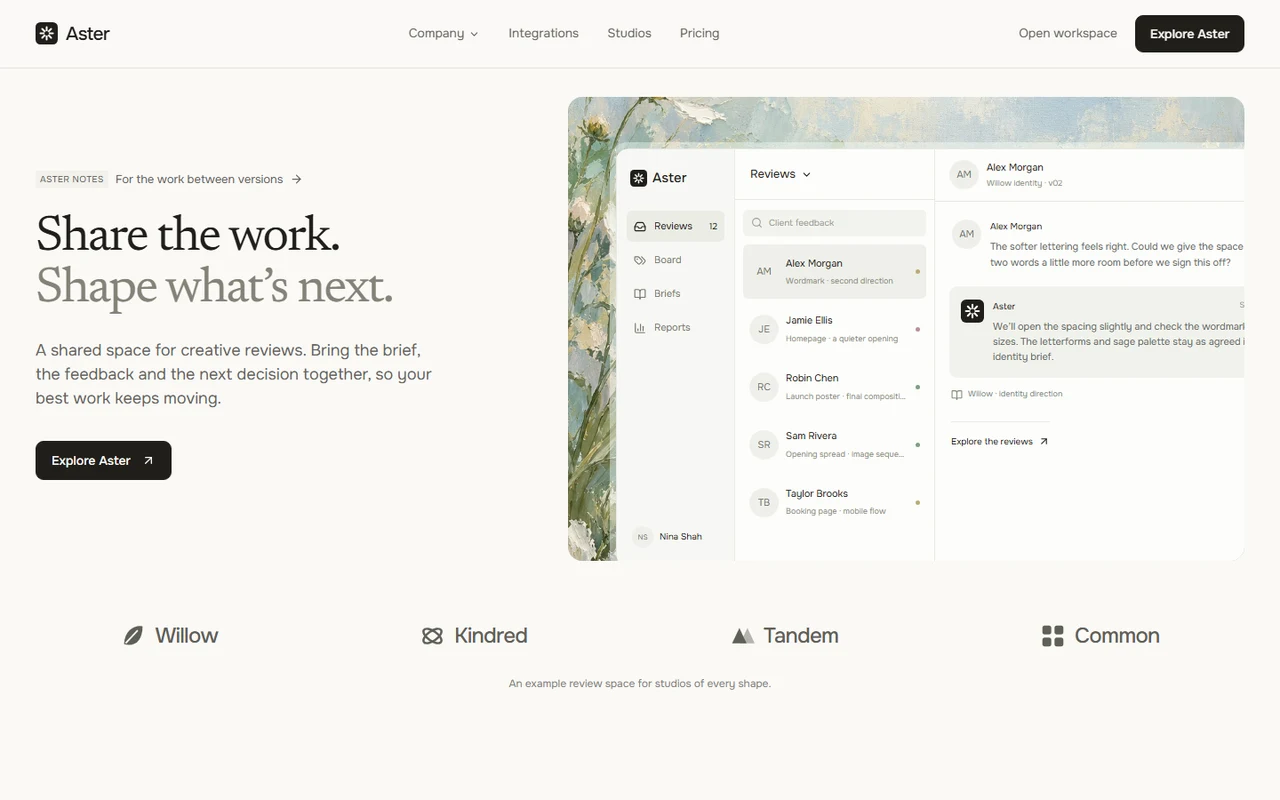
A complete creative workflow product with original positioning, project scenarios and editorial copy. Serif headings, warm ivory and botanical artwork frame a working review space for independent creatives, design studios and their clients.
- Made for
- Creative review and approval products, Design studios and independent creative practices, Client collaboration and project workflow platforms
- Highlights
- Newsreader and Onest typography with original botanical backgrounds
- Interactive review preview, sticky chapters and keyboard-accessible tabs
- Project filters, studio responses, revision requests, briefs and approvals
- Complete billing reviews, connection directory, contact and editorial pages
- The look
- Newsreader display type and Onest reading text. Warm ivory, ink, quiet sage and powder blue. Original botanical paintings sit behind editable product scenes; compact rectangular controls and open section headings keep the page spacious. A split hero leads into three product tiles, stacked chapters, four use cases, trust details, three plans and original portrait perspectives.
Sections
- 01
Navigation and hero
Compact sticky navigation, accessible company/mobile menus, two-line serif heading and selectable creative feedback over original botanical artwork.
- 02
Illustrated features
Three focused product illustrations with original botanical backdrops and working workspace destinations.
- 03
Stacked product chapters
Three wide scene-and-copy panels stack on desktop and read in normal order on phones or with reduced motion.
- 04
Tabbed use cases
Four keyboard-accessible tabs coordinate copy, illustrations and workspace destinations. Phone labels remain readable in a horizontal rail.
- 05
Creative review workspace
Twelve original reviews across four projects, with combined filters, editable studio responses, approvals, owner/reason revision requests, complete briefs, calculated reports, history and matching CSV/JSON exports.
- 06
Trust
Four capabilities covering project context, named revision owners, decision history and complete review exports.
- 07
Pricing
Three plans, monthly/annual selection and full billing reviews with a correctly handled custom tier.
- 08
Studio story
An illustrative creative director’s perspective pairs original artwork with a serif quote and counts calculated from the sample reviews.
- 09
Team perspectives
Four original fictional team perspectives with locally shipped editorial portraits.
- 10
FAQ
Native disclosures cover the local review process, client notifications, project briefs, pricing and customization.
- 11
Closing and footer
An illustrated review-space closing, complete resource links and a remembered motion preference.
- 12
Contact and resources
Searchable connection directory with scope guides, validated local contact brief or configured JSON submission, journal, articles, about, updates, editable policy pages and a custom missing-page state.
Remove a section by deleting its line in app/page.tsx, or move the line to reorder.
Make it yours
Begin with site.config.ts for branding, copy, plans and destinations. Creative reviews, project briefs, studio stories, connections and editorial pages live in their own focused data files.
| To change | Edit |
|---|---|
| Brand, metadata, copy, FAQ, plans and destinations | site.config.ts |
| Reviews, project versions, filters, metrics and decisions | data/reviews.ts |
| Project briefs, direction and deliverables | data/briefs.ts |
| Teams, connections and supporting pages | data/teams.ts, data/integrations.ts and data/pages.ts |
| Palette, shared type and control dimensions | styles/base.css |
| Original artwork, portraits and prompt set | public/images/ and ASSETS.md |
Run it
$ npm install$ npm run devNode.js 20.9 or newer. No environment variables.
Before you go live
Replace fictional studios, quotes, projects and allowances. Configure app, checkout and contact destinations and replace policy placeholders. Local approvals, revision requests, briefs, reports and exports work; connect storage, file uploads, client permissions, notifications and billing for your production service.
Specifications
- Framework
- Next.js 15 (App Router), React 19
- Language
- TypeScript
- Styling
- CSS with design tokens and component styles
- Fonts
- Newsreader, Onest, self-hosted with next/font
- Dependencies
- next, react, react-dom, lucide-react
- Images
- Three original botanical paintings and four fictional editorial portraits generated with the built-in imagegen tool. Optimized WebP assets ship locally. Marks and interfaces are original editable SVG, CSS and React.
- API keys and environment variables
- None
- Node.js
- 20.9 or newer
- Colour scheme
- Light
- Responsive
- Desktop, tablet and phone
- Accessibility
- Skip link, visible focus, keyboard navigation, reduced motion
- Deploys to
- Vercel, Netlify, Cloudflare Pages or any Node host
- Codebase
- 61 source files, about 7,700 lines
- Last updated
- Oct 9, 2026
License
One license, no tiers. The full text ships as LICENSE.md in the download.
You can
- Use it for your own products
- Use it for any number of client projects
- Change the code and design however you like
- Deploy the result commercially
You can’t
- Resell or share the files as a template, theme or UI kit
- Publish the source as a template in a public repository
Questions
What do I get when I buy Aster?
The complete Aster project as a download: the Next.js app, its config file, a README with setup and customisation notes, and the license. The download link arrives right after checkout.
Can I use Aster for client projects?
Yes. One purchase covers your own products and any number of client projects, and you can change the code however you like. What you can’t do is resell or share the template files themselves as a template or UI kit.
Do I need API keys, a database or a backend?
No. It runs with npm install and npm run dev and deploys to Vercel, Netlify or Cloudflare Pages without any environment variables.
What should I change before I launch?
Replace fictional studios, quotes, projects and allowances. Configure app, checkout and contact destinations and replace policy placeholders. Local approvals, revision requests, briefs, reports and exports work; connect storage, file uploads, client permissions, notifications and billing for your production service.
Do I need to know Next.js?
Basic React helps, but most changes are text edits in site.config.ts. The README walks through colours, fonts and section order.
How do updates work?
Updates to Aster are free. When a new version ships, download it again from the link in your order email.
Can I get a refund?
Yes. If Aster isn’t right for you, reply to your receipt within 14 days and you get your money back.
Should I buy all-access instead?
If you’ll use more than two templates, yes. All-access is $99 for all 19 templates, including Aster and every template added later. Three single templates would cost $117.
All-access
All 19 templates for $99.
Every template in the library, including Aster, and every one added later. Same license, free updates. Less than three single templates.