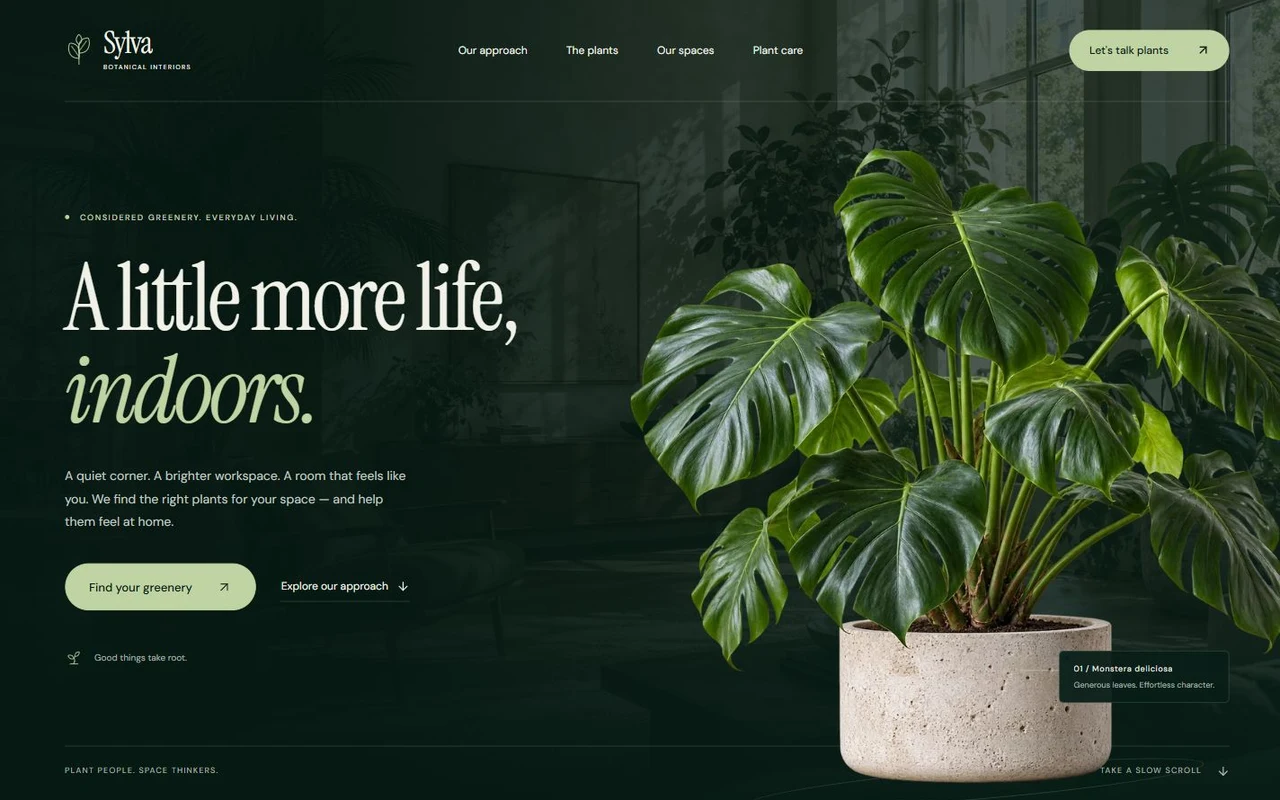
Sylva: Botanical interior studio landing page template for Next.js.
- Next.js 15
- CSS
- TypeScript
- 7 sections
- Dark
- No API keys
- Updated Oct 9, 2026

Overview
An atmospheric, motion-led website for plant stylists, interior greenery studios and boutique nurseries. Original positioning and imagery pair thoughtful plant selection with an honest, usable enquiry flow.
- Made for
- Botanical interior and plant styling studios, Boutique nurseries and curated plant businesses, Greenery services for homes, offices and hospitality
- Highlights
- Original plant cutouts, interior photography and Instrument Serif typography
- Scroll-led specimen journey, unfolding collection and organic photo frames
- Filterable plants, individual care pages and three space-specific routes
- Reviewed project briefs, real downloads and an optional contact endpoint
- The look
- Deep forest green, pale lichen accents, Instrument Serif display type and DM Sans. A large, original Monstera travels from an interior-led hero into an organic nursery panel. Three cards unfold on scroll; a three-step approach, an orbiting care specimen, an asymmetric interior gallery and a generous closing lead to an oversized wordmark.
Sections
- 01
Hero and approach
A living interior backdrop, sculptural plant cutout and scroll-led specimen journey introduce the studio. An organic nursery panel links to the full approach.
- 02
The collection
Three plant cards spread from a deck into a browsable row. A separate collection combines light and size filters, with a useful empty state.
- 03
Plant detail pages
Each plant has its own character, light and scale guidance, three care notes and an enquiry link that carries the chosen plant into the form.
- 04
Approach and care
Native process disclosures, a central specimen with four care principles, an about page and a plant-care library.
- 05
Spaces
Original home, workspace and café images in an asymmetric gallery. Dedicated space pages carry the selected context into the enquiry.
- 06
FAQ, closing and footer
Five native FAQ disclosures, a considered closing, a large wordmark.
- 07
Project enquiries
Validated details, inline review, editable briefs, matching plain-text downloads and an optional JSON POST endpoint with retained input on failure. An email hand-off appears when configured.
Remove a section by deleting its line in app/page.tsx, or move the line to reorder.
Make it yours
Start in site.config.ts for brand, copy, imagery, links and contact delivery. Plant and space content each live in a focused data file.
| To change | Edit |
|---|---|
| Brand, metadata, copy, booking and contact destinations | site.config.ts |
| Plant selection, imagery, light, scale and care notes | data/plants.ts |
| Space types, images and project scopes | data/spaces.ts |
| Palette, type and gutters | styles/base.css |
| Motion timing and scroll choreography | components/Motion.tsx and styles/motion.css |
| Local imagery and original prompts | public/images/ and ASSETS.md |
Run it
$ npm install$ npm run devNode.js 20.9 or newer. No environment variables.
Before you go live
Replace fictional studio branding, service descriptions and generated portfolio images as appropriate. Add your booking link, email or contact endpoint, and replace the included privacy notice. The template saves project briefs locally by default; it does not claim to send enquiries, sell plants or collect payments without your configured service.
Specifications
- Framework
- Next.js 15 (App Router), React 19
- Language
- TypeScript
- Styling
- CSS with design tokens and component styles
- Fonts
- Instrument Serif, DM Sans, self-hosted with next/font
- Dependencies
- next, react, react-dom, lucide-react
- Images
- Eight original images generated with the built-in imagegen tool: three transparent plant cutouts and five interior/nursery photographs. Optimized WebP files ship locally; prompt provenance is included.
- API keys and environment variables
- None
- Node.js
- 20.9 or newer
- Colour scheme
- Dark
- Responsive
- Desktop, tablet and phone
- Accessibility
- Skip link, visible focus, keyboard navigation, reduced motion
- Deploys to
- Vercel, Netlify, Cloudflare Pages or any Node host
- Codebase
- 64 source files, about 4,600 lines
- Last updated
- Oct 9, 2026
License
One license, no tiers. The full text ships as LICENSE.md in the download.
You can
- Use it for your own products
- Use it for any number of client projects
- Change the code and design however you like
- Deploy the result commercially
You can’t
- Resell or share the files as a template, theme or UI kit
- Publish the source as a template in a public repository
Questions
What do I get when I buy Sylva?
The complete Sylva project as a download: the Next.js app, its config file, a README with setup and customisation notes, and the license. The download link arrives right after checkout.
Can I use Sylva for client projects?
Yes. One purchase covers your own products and any number of client projects, and you can change the code however you like. What you can’t do is resell or share the template files themselves as a template or UI kit.
Do I need API keys, a database or a backend?
No. It runs with npm install and npm run dev and deploys to Vercel, Netlify or Cloudflare Pages without any environment variables.
What should I change before I launch?
Replace fictional studio branding, service descriptions and generated portfolio images as appropriate. Add your booking link, email or contact endpoint, and replace the included privacy notice. The template saves project briefs locally by default; it does not claim to send enquiries, sell plants or collect payments without your configured service.
Do I need to know Next.js?
Basic React helps, but most changes are text edits in site.config.ts. The README walks through colours, fonts and section order.
How do updates work?
Updates to Sylva are free. When a new version ships, download it again from the link in your order email.
Can I get a refund?
Yes. If Sylva isn’t right for you, reply to your receipt within 14 days and you get your money back.
Should I buy all-access instead?
If you’ll use more than two templates, yes. All-access is $99 for all 31 templates, including Sylva and every template added later. Three single templates would cost $117.
All-access
All 31 templates for $99.
Every template in the library, including Sylva, and every one added later. Same license, free updates. Less than three single templates.