Heckle: To-do app landing page template for Next.js.
$39one-time payment
- Next.js 16
- CSS
- TypeScript
- 9 sections
- Light
- No API keys
- Palette
- Updated Oct 29, 2026
01Overview
At a glance
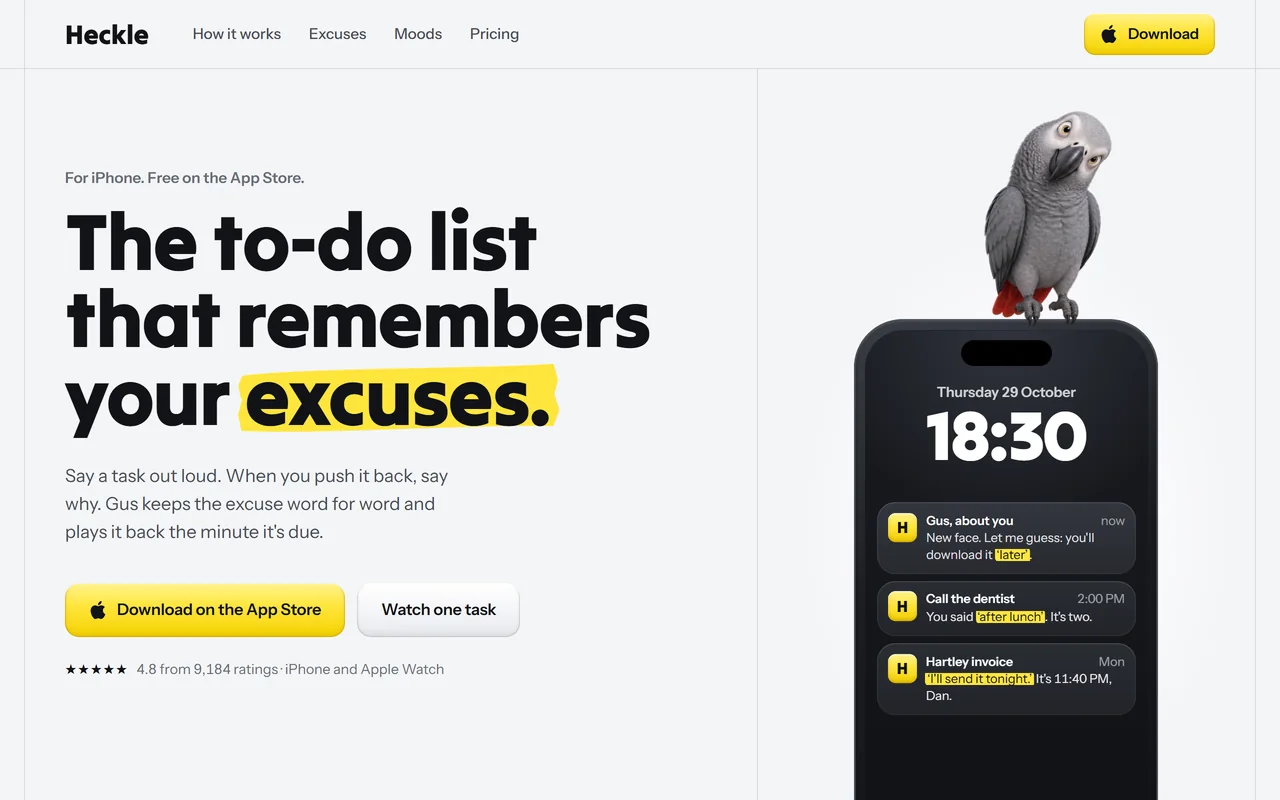
A complete launch page for an iOS app whose character talks back. The example is Heckle, a to-do app where you say why you're pushing a task back and a parrot plays the excuse back when it's due. The page does the same to the visitor: everything Gus says about them, they really did.
Made for
- Consumer iOS apps with a mascot, a character or a strong voice
- To-do, habit, focus, fitness and accountability apps
- Indie developers who want an App Store page people screenshot and share
What stands out04
- A mascot who reacts to what each visitor really does: hovers, tab switches, skimming, re-reading, return visits, sitting still
- The visitor's own heckles arrive as notifications on the hero phone's live lock screen
- One task followed across two days in a pinned scene, the phone and the parrot answering each line
- A closing sentence built from the visit itself, plus a mascot guide and an offline kit to make your own
02The look
Its own palette and type
The colours and type it ships with. Tap a colour to copy it.
- AaTilt WarpIncluded with the template
The quick brown fox jumps over the lazy dog
0123456789
- AaInstrument SansIncluded with the template
The quick brown fox jumps over the lazy dog
0123456789
Tilt Warp for headings, numbers and everything the parrot says, Instrument Sans for reading. A cool off-white page inside a visible frame of rails and full-width rules, where the parrot stands on pearl rods lying on the rules. One signal, highlighter yellow, always means someone's own words or own record: quoted excuses, what the page noticed about the visitor, the download button. One graphite band for the comparison. The mascot is six poses of one soft-rendered African grey, lined up on his feet so every change of pose reads as one bird reacting.
03Sections
9 sections, in page order
From the first screen to the footer.
- 01
Hero
"The to-do list that remembers your excuses." with the last word drawn over in highlighter. Beside it a phone on the visitor's own clock, Gus perched on its top edge, and a lock screen where his remarks about the visitor arrive as notifications above the app's own.
- 02
Proof
Three figures on pearl tokens: excuses kept, tasks done after a playback, the App Store rating.
- 03
How it works
Pinned: one task (call the dentist) across two days. A script of who said what and when lights line by line while the phone moves from the new task to the snooze sheet, the lock-screen playback and the ticked task, and Gus strikes a pose and comments on each.
- 04
The excuses
The six excuses people use most, each drawn as a highlighter stroke as long as its share, with how often the task got done after Gus played it back. Gus side-eyes from his rod beneath.
- 05
Moods
Three of Gus on one rod: Polite, Blunt and Unhinged. Tap one and he plays the same excuse back his way.
- 06
Compared
A graphite band: what a normal list does beside what Heckle does, our column lit, with Gus perched on its header.
- 07
Reviews, pricing, FAQ
Quotes about one moment each with the number that changed, in cells of different widths. A free plan and Heckle+, each with the moods it includes standing on a rod. Questions beside a sticky head, one open at a time.
- 08
Closing
One big sentence made of the visit: how long they've been here and what they did, in highlighter, then "Let me guess: ‘later.’" and a button to prove him wrong. Gus falls asleep on the footer's wordmark.
- 09
Pages
A support page (the App Store asks for one), privacy and terms placeholders and a 404, each with Gus on a rod and a line of his own.
04Make it yours
Where everything lives
Every word, number and line Gus says lives in site.config.ts, including what he says about the visitor and when. The mascot is six pictures of one character; a step-by-step guide shows how to have yours made by an illustrator or an AI image tool, and an offline kit lines the pictures up on its feet and writes the settings. npm run verify:content checks the story, the excuses and every sentence that quotes a number.
| To change | Edit |
|---|---|
| Brand, App Store link, copy, plans, reviews, FAQ | site.config.ts |
| What Gus says about the visitor | site.config.ts → heckles |
| The two-day story and its phone screens | site.config.ts → listening |
| Your mascot's six poses and where its feet are | site.config.ts → mascot, public/images/ |
| Making your mascot, step by step | MASCOT.md, tools/mascot-kit.html |
| Palette, type, buttons and the frame | styles/base.css, app/layout.tsx |
| Section order | app/page.tsx |
Run it
$ npm install$ npm run devNode.js 20.9 or newer. No environment variables.
Before you go live
Set links.appStore (every download button uses it), links.email and site.url in site.config.ts, replace the example app's words, figures and reviews, swap in your own mascot or keep Gus, rewrite his lines in your character's voice, and have the privacy, terms and support placeholders rewritten.
05Specifications
What’s under the hood
- sections
- 9
- source files
- 68
- lines of code
- ~4,800
- dependencies
- 3
- API keys needed
- 0
Stack
- Framework
- Next.js 16 (App Router), React 19
- Language
- TypeScript
- Styling
- CSS with design tokens and component styles
- Dependencies
nextreactreact-dom
Design
- Fonts
- Tilt Warp, Instrument Sans, self-hosted with next/font
- Images
- Six poses of the parrot mascot on transparency (idle, squawk, head tilt, side-eye, laughing, asleep; 220 KB together). The iPhone, the lock screen, every app screen, the highlighter strokes, the perches and the icons are HTML, CSS and SVG.
- Colour scheme
- Light
- Responsive
- Desktop, tablet and phone
Quality
- Accessibility
- Skip link, visible focus, keyboard navigation, reduced motion
- API keys and environment variables
- None
- Node.js
- 20.9 or newer
Shipping
- Deploys to
- Vercel, Netlify, Cloudflare Pages or any Node host
- Codebase
- 68 source files, about 4,800 lines
- Last updated
- Oct 29, 2026
06License
One license, no tiers
The full text ships as LICENSE.md in the download and is on the license page.
You can
- Use it for your own products
- Use it for any number of client projects
- Change the code and design however you like
- Deploy the result commercially
You can’t
- Resell or share the files as a template, theme or UI kit
- Publish the source as a template in a public repository
07Questions
Before you buy
What do I get when I buy Heckle?
The complete Heckle project as a download: the Next.js app, its config file, a README with setup and customisation notes, and the license. It’s added to your account’s library the moment payment goes through.
Can I use Heckle for client projects?
Yes. One purchase covers your own products and any number of client projects, and you can change the code however you like. What you can’t do is resell or share the template files themselves as a template or UI kit.
Do I need API keys, a database or a backend?
No. It runs with npm install and npm run dev and deploys to Vercel, Netlify or Cloudflare Pages without any environment variables.
What should I change before I launch?
Set links.appStore (every download button uses it), links.email and site.url in site.config.ts, replace the example app's words, figures and reviews, swap in your own mascot or keep Gus, rewrite his lines in your character's voice, and have the privacy, terms and support placeholders rewritten.
Do I need to know Next.js?
Basic React helps, but most changes are text edits in site.config.ts. The README walks through colours, fonts and section order.
How do updates work?
Updates to Heckle are free. When a new version ships, download it again from your library.
Can I get a refund?
Before you download it, yes: email support@hairlineui.com within 14 days and you get your money back, no reason needed. After you download, if Heckle doesn’t work as described, we fix it, and if we can’t, we refund it. A change of mind after downloading isn’t refunded, because you keep the code, so try the live demo first: it’s the whole template.
Should I buy all-access instead?
If you’ll use 5 or more templates, yes. All-access is $159 for all 61 templates, including Heckle and every template added later; 5 single templates would cost $195. The price rises as the library grows: 9 more templates and it goes to $169.
08All-access
All 61 templates for $159. And every one added later.
Every template in the library, including Heckle. Same license, free updates, and less than 5 single templates would cost.
61 templates today$2.61 each
9 more and it’s $169. Buy today and every one after is yours at $159.
09More templates