Patch: AI builder and developer tool landing page template for Next.js.
- Next.js 15
- Tailwind CSS v4
- TypeScript
- 10 sections
- Light
- No API keys
- Updated Oct 9, 2026

Overview
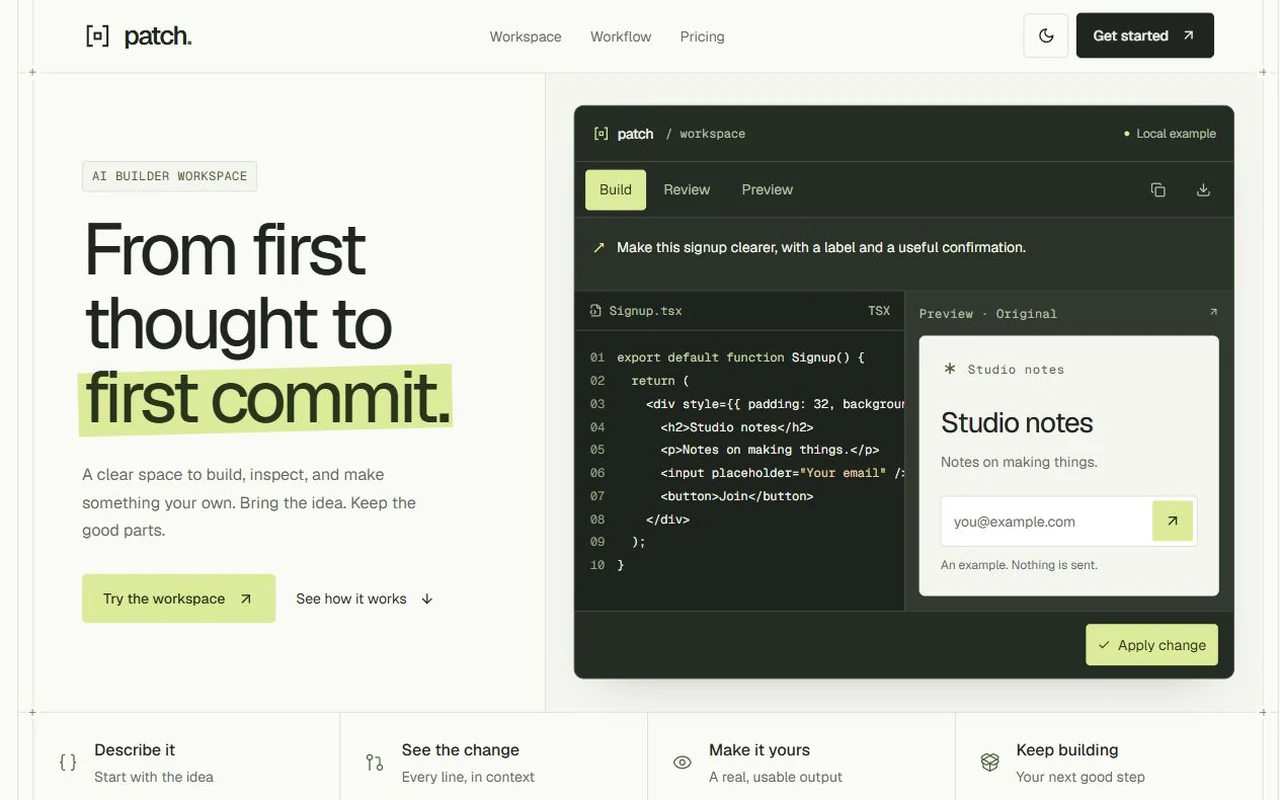
A precise launch page for AI builders, developer tools and small component products. An architectural grid joins a split headline, interactive code-and-output workspace, original product studies, two complete appearances and usable React example exports.
- Made for
- AI coding and builder tools, Developer utilities and browser extensions, Component products and indie apps
- Highlights
- Three component examples with Apply, Undo and code review
- Chalk and graphite appearances with a shared page grid
- Keyboard command menu, responsive previews and real TSX exports
- Modular sections, typed content config and screenshot replacements
- The look
- Chalk, ink and citrus, anchored by a graphite editor. Compact navigation, shared type roles, one badge per main section and continuous rails organize the page. Three joined pricing columns and a bold ink closing action complete the composition. Section rules meet real boundaries; original CSS/SVG studies stay editable without stock imagery.
Sections
- 01
Navigation
Anchor links, mobile menu, appearance switch and a working example-selector action.
- 02
Hero
A 5/7 split composition with an emphasized headline and real Build, Review and Preview workspace views.
- 03
Capabilities
Four joined cells that explain the building sequence.
- 04
Workspace
Three prepared React examples with independent state, Apply/Undo, code review, clipboard and TSX downloads.
- 05
Product details
An 8/4 and three-column feature matrix with responsive previews, file context, command menu, theme studies and exports.
- 06
Workflow
Three keyboard-accessible steps with distinct request, diff and file compositions.
- 07
Starting points
App, browser extension and component-product studies with coordinated copy and example actions.
- 08
Pricing
Three joined plans with an emphasized Builder tier, a comparison ledger, independent billing destinations and accurate review dialogs.
- 09
FAQ
Native disclosures that explain the local previews and buyer integrations.
- 10
Closing and footer
An ink-colored closing field with two working actions and an original mark, followed by useful navigation and an oversized wordmark.
Remove a section by deleting its line in app/page.tsx, or move the line to reorder.
Make it yours
Start with site.config.ts for the brand, primary copy, links, plans and appearance. Product examples and interface microcopy have their own small files, listed below.
| To change | Edit |
|---|---|
| Brand, metadata, primary copy, links, plans, FAQ and appearance | site.config.ts |
| Chalk and graphite palettes and shared typography | styles/base.css |
| Fonts | app/layout.tsx |
| Section order | app/page.tsx |
| Full before/after example code and diff excerpts | data/signup.ts, data/pricing.ts and data/command.ts |
| Rendered product previews and microcopy | components/product/ |
| Product screenshot replacements | site.config.ts → workspace and useCases.items |
Run it
$ npm install$ npm run devNode.js 20.9 or newer. No environment variables.
Before you go live
Set links.app, links.docs, links.email and both billing destinations for each plan in site.config.ts. Replace the fictional brand, product claims and prices. The prepared examples run locally and export standard React components; connect your real app, AI service, email provider and checkout separately.
Specifications
- Framework
- Next.js 15 (App Router), React 19
- Language
- TypeScript
- Styling
- Tailwind CSS v4 with design tokens and component styles
- Fonts
- Geist, Geist Mono, self-hosted with next/font
- Dependencies
- next, react, react-dom, lucide-react
- Images
- Original HTML/CSS/SVG mark, workspace and product illustrations. No external photography or reference-site assets. Optional product screenshot slots are included.
- API keys and environment variables
- None
- Node.js
- 20.9 or newer
- Colour scheme
- Light
- Responsive
- Desktop, tablet and phone
- Accessibility
- Skip link, visible focus, keyboard navigation, reduced motion
- Deploys to
- Vercel, Netlify, Cloudflare Pages or any Node host
- Codebase
- 62 source files, about 5,700 lines
- Last updated
- Oct 9, 2026
License
One license, no tiers. The full text ships as LICENSE.md in the download.
You can
- Use it for your own products
- Use it for any number of client projects
- Change the code and design however you like
- Deploy the result commercially
You can’t
- Resell or share the files as a template, theme or UI kit
- Publish the source as a template in a public repository
Questions
What do I get when I buy Patch?
The complete Patch project as a download: the Next.js app, its config file, a README with setup and customisation notes, and the license. The download link arrives right after checkout.
Can I use Patch for client projects?
Yes. One purchase covers your own products and any number of client projects, and you can change the code however you like. What you can’t do is resell or share the template files themselves as a template or UI kit.
Do I need API keys, a database or a backend?
No. It runs with npm install and npm run dev and deploys to Vercel, Netlify or Cloudflare Pages without any environment variables.
What should I change before I launch?
Set links.app, links.docs, links.email and both billing destinations for each plan in site.config.ts. Replace the fictional brand, product claims and prices. The prepared examples run locally and export standard React components; connect your real app, AI service, email provider and checkout separately.
Do I need to know Next.js?
Basic React helps, but most changes are text edits in site.config.ts. The README walks through colours, fonts and section order.
How do updates work?
Updates to Patch are free. When a new version ships, download it again from the link in your order email.
Can I get a refund?
Yes. If Patch isn’t right for you, reply to your receipt within 14 days and you get your money back.
Should I buy all-access instead?
If you’ll use more than two templates, yes. All-access is $99 for all 17 templates, including Patch and every template added later. Three single templates would cost $117.
All-access
All 17 templates for $99.
Every template in the library, including Patch, and every one added later. Same license, free updates. Less than three single templates.