Mordant: Clothing brand website template for Next.js.
$39one-time payment
- Next.js 16
- CSS
- TypeScript
- 9 sections
- Light
- No API keys
- Palette
- Updated Nov 11, 2026
01Overview
At a glance
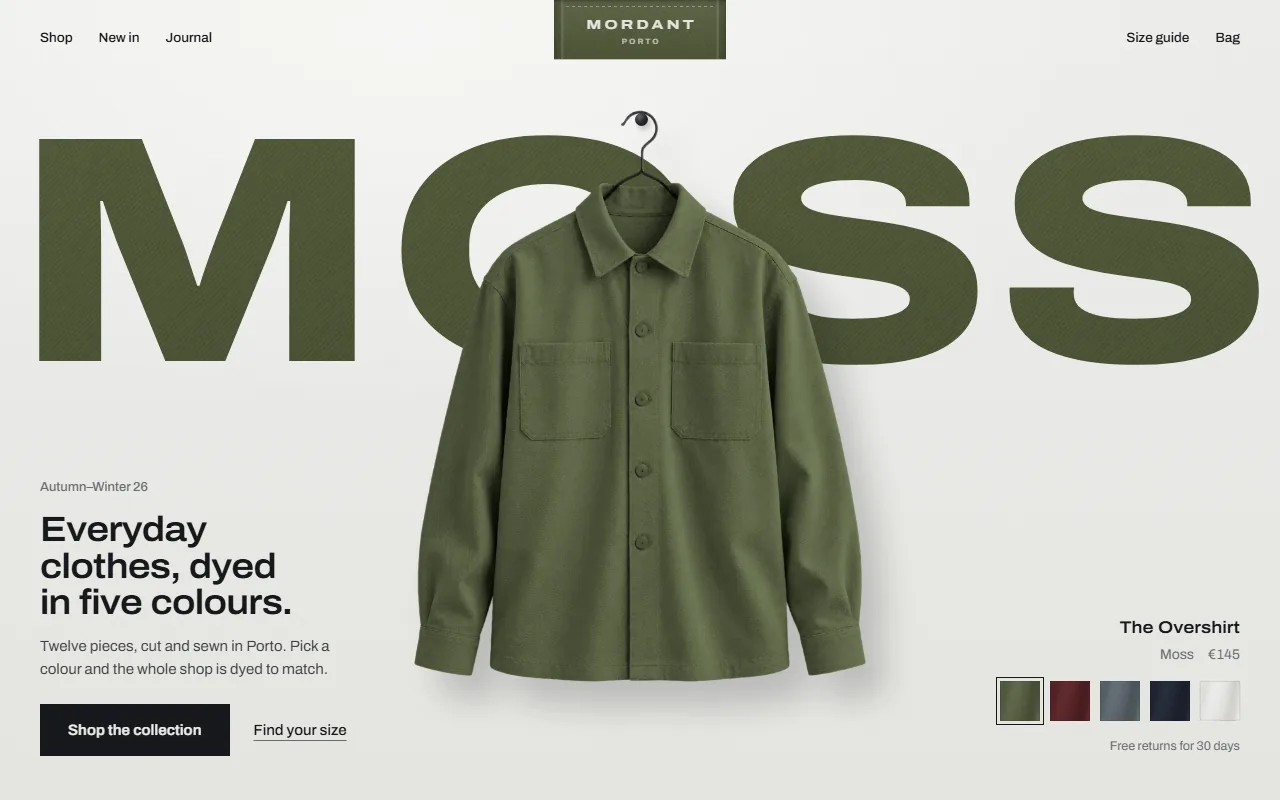
A complete website for Mordant, a fictional label of everyday clothes made in five colours. Nothing on the page has colour except the cloth: the visitor picks a colour and dye rises through the label, the headings, the rack and the pieces, then follows them to the product pages and the end of the page, where their piece waits in their colour and size with the bag link filled in.
Made for
- Clothing labels with colourways: basics, workwear, knitwear, streetwear, womenswear
- Direct-to-consumer brands selling through Shopify, Stripe links or any checkout
- Any product sold in colours, from bags to homeware, that wants a shop front with a signature
What stands out04
- One dye bath: a waterline rises through the woven label, cloth letters and the hanging piece together
- A rack of pieces on pegs that dyes in one wave, and says which pieces aren't made in a colour
- A size finder: people to scale beside a tailor's tape, the answer on a woven size label from 2,316 fit records
- Product pages for every piece, a size guide, journal, care labels for help, and a closing cloth that dyes as you scroll
02The look
Its own palette and type
The colours and type it ships with. Tap a colour to copy it.
- AaArchivoIncluded with the template
The quick brown fox jumps over the lazy dog
0123456789
Archivo in three widths: wide for the colour's name and the woven labels, slightly wide for headings, regular for reading. A studio-grey wall, ink type and no accent colour: the only colour is the dye. One word in every heading is set in twill letters dyed in the visitor's colour. Pieces hang on pegs with their shadow on the wall, help is printed on satin care labels, and the button is a flat ink block.
03Sections
9 sections, in page order
From the first screen to the footer.
- 01
First screen
The woven label sewn into the top edge as the header, the colour's name in giant cloth letters behind the piece on its peg, the headline and the tag with swatches in the corners. It opens undyed; the first colour rises through all of it, and the colours come round by themselves until the visitor picks one.
- 02
The rack
Seven pieces on pegs along a rail and an empty hanger for the rest of the shop. Pick a colour and the whole rack dyes in one wave; pieces not made in it keep their own colour and say so.
- 03
Up close
The section holds while you scroll through three close-ups of the cloth, each dyed in the visitor's colour, with the spec on a woven label and a small picture of the piece marking where the detail is.
- 04
Find your size
Three people photographed to scale beside a tailor's tape; drag the line to your height (cm or ft/in) and the answer appears on a woven size label, with what share of people your height took it, a fit preference and reviews from people near your height.
- 05
Worn
Three pictures from the shoot as a spread, each piece numbered on the picture and credited underneath with its colour and price; pointing at either lights the other.
- 06
Next colour
The next colour's name and the piece hang undyed; leaving an email makes the colour rise through both.
- 07
Help
Sizing, delivery, returns and care printed on four satin care labels sewn into one seam, with laundry symbols. Every answer is visible.
- 08
Closing and footer
A length of raw cloth the visitor's colour rises through as it scrolls in, the words woven into it changing thread as the dye passes, ending on their piece, colour and size and an Add to bag link, with the footer on the dyed cloth.
- 09
Pages
A product page for every piece (dye picker, sizes, bag link with colour and size), a size guide, a journal with three articles, a contact page with a working form, privacy and terms and a custom 404.
04Make it yours
Where everything lives
Every piece, colour, price, size, heading and link lives in site.config.ts. The size finder answers from plain records you can replace with an export from your reviews tool. Set a word in a heading in [brackets] to dye it.
| To change | Edit |
|---|---|
| Brand, label, colours, pieces, prices, sizes, copy and footer | site.config.ts |
| Where Add to bag goes (Shopify, Stripe links, any checkout) | site.config.ts → pieces[].storeUrl |
| Fit records and reviews behind the size finder | data/fit.ts |
| Journal articles | data/articles.ts |
| Size guide, contact, legal and 404 copy | data/pages.ts |
| Wall, ink, type and the button | styles/base.css, app/layout.tsx |
| Garment photos, close-ups and the shoot | public/images/ |
| Section order | app/page.tsx |
Run it
$ npm install$ npm run devNode.js 20.9 or newer. No environment variables.
Before you go live
Replace the fictional label, pieces, prices and reviews, and the photographs with your own (see ASSETS.md). Set each piece's storeUrl, brand.bag, next.endpoint and the contact form's endpoint, or keep the email fallback.
05Specifications
What’s under the hood
- sections
- 9
- source files
- 118
- lines of code
- ~5,700
- dependencies
- 3
- API keys needed
- 0
Stack
- Framework
- Next.js 16 (App Router), React 19
- Language
- TypeScript
- Styling
- CSS with design tokens and component styles
- Dependencies
nextreactreact-dom
Design
- Fonts
- Archivo, self-hosted with next/font
- Images
- Garments in every colourway, three close-ups, three fit photos, three editorial looks and three journal covers, about 2.5 MB of WebP. The cloth texture and the dye's waterline are drawn in code.
- Colour scheme
- Light
- Responsive
- Desktop, tablet and phone
Quality
- Accessibility
- Skip link, visible focus, keyboard navigation, reduced motion
- API keys and environment variables
- None
- Node.js
- 20.9 or newer
Shipping
- Deploys to
- Vercel, Netlify, Cloudflare Pages or any Node host
- Codebase
- 118 source files, about 5,700 lines
- Last updated
- Nov 11, 2026
06License
One license, no tiers
The full text ships as LICENSE.md in the download and is on the license page.
You can
- Use it for your own products
- Use it for any number of client projects
- Change the code and design however you like
- Deploy the result commercially
You can’t
- Resell or share the files as a template, theme or UI kit
- Publish the source as a template in a public repository
07Questions
Before you buy
What do I get when I buy Mordant?
The complete Mordant project as a download: the Next.js app, its config file, a README with setup and customisation notes, and the license. It’s added to your account’s library the moment payment goes through.
Can I use Mordant for client projects?
Yes. One purchase covers your own products and any number of client projects, and you can change the code however you like. What you can’t do is resell or share the template files themselves as a template or UI kit.
Do I need API keys, a database or a backend?
No. It runs with npm install and npm run dev and deploys to Vercel, Netlify or Cloudflare Pages without any environment variables.
What should I change before I launch?
Replace the fictional label, pieces, prices and reviews, and the photographs with your own (see ASSETS.md). Set each piece's storeUrl, brand.bag, next.endpoint and the contact form's endpoint, or keep the email fallback.
Do I need to know Next.js?
Basic React helps, but most changes are text edits in site.config.ts. The README walks through colours, fonts and section order.
How do updates work?
Updates to Mordant are free. When a new version ships, download it again from your library.
Can I get a refund?
Before you download it, yes: email support@hairlineui.com within 14 days and you get your money back, no reason needed. After you download, if Mordant doesn’t work as described, we fix it, and if we can’t, we refund it. A change of mind after downloading isn’t refunded, because you keep the code, so try the live demo first: it’s the whole template.
Should I buy all-access instead?
If you’ll use 5 or more templates, yes. All-access is $159 for all 61 templates, including Mordant and every template added later; 5 single templates would cost $195. The price rises as the library grows: 9 more templates and it goes to $169.
08All-access
All 61 templates for $159. And every one added later.
Every template in the library, including Mordant. Same license, free updates, and less than 5 single templates would cost.
61 templates today$2.61 each
9 more and it’s $169. Buy today and every one after is yours at $159.
09More templates