Soak: Playful iOS app landing page template with a mascot template for Next.js.
- Next.js 16
- CSS
- TypeScript
- 8 sections
- Light
- No API keys
- Palette
- Updated Oct 22, 2026
01Overview
At a glance
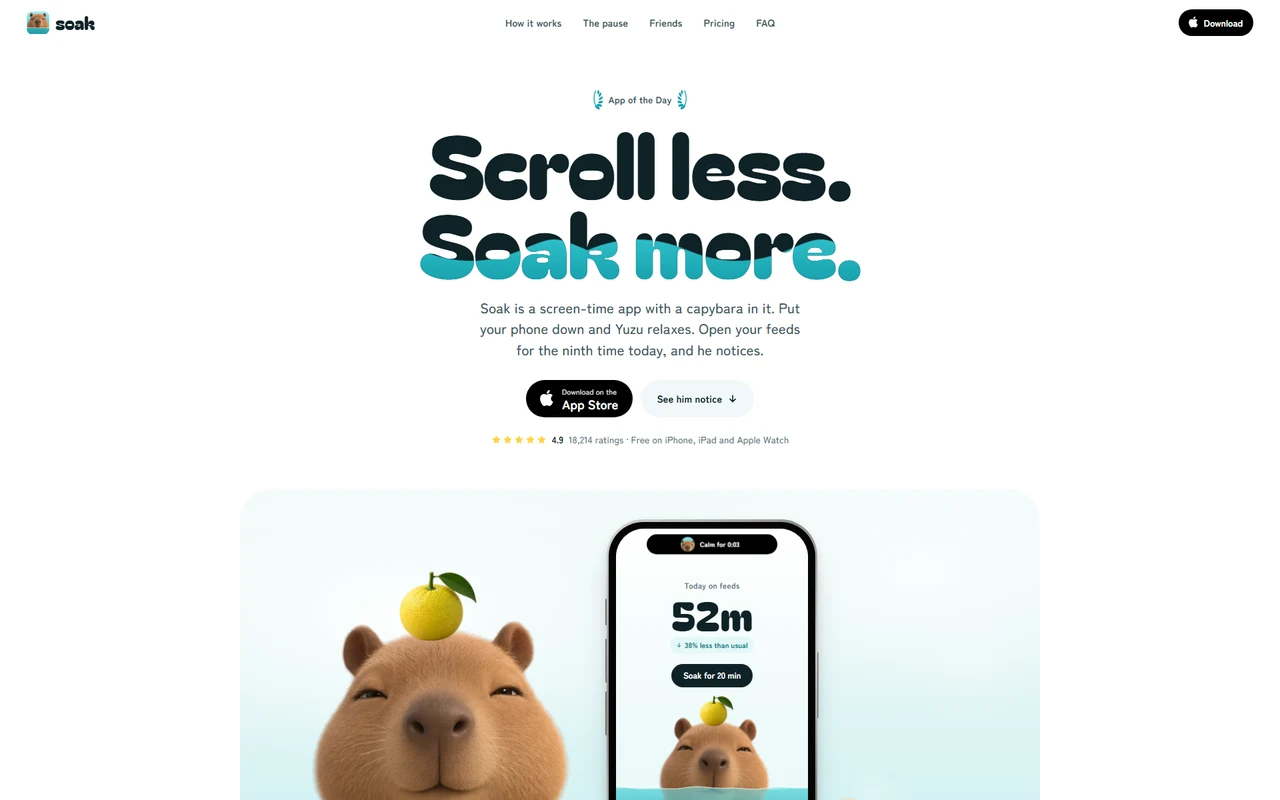
A complete launch page for an iOS app, led by a character who reacts to whoever is reading. Soak is a screen-time app with a capybara in it, and the page behaves like the app: doomscroll it and Yuzu gets frazzled, put it down and he relaxes. Every interaction is something a visitor wants to try twice.
Made for
- Consumer iOS apps with a mascot or a character, or room for one
- Habit, focus, wellbeing, screen-time and sleep apps
- Indie developers who want an App Store page that people share
- A mascot that reacts to the visitor: frazzled when they scroll fast, asleep when they sit still, leaning towards the pointer
- The hero phone's Dynamic Island rides up and docks as the page's Live Activity, then opens into the menu
- A home screen you can use: open a feed and bath water rises with him for one breath before you choose
- Friends you drag onto his head that stack and wobble, plus a mascot guide and an offline kit to make your own
02The look
Its own palette and type
The colours and type it ships with. Tap a colour to copy it.
- AaBagel Fat OneIncluded with the template
The quick brown fox jumps over the lazy dog
0123456789
- AaZen Maru GothicIncluded with the template
The quick brown fox jumps over the lazy dog
0123456789
Bagel Fat One for headings and numbers, Zen Maru Gothic for everything you read. A white page where hot-spring water is the only colour: in the headline's letters, in the baths, in the buttons' fills. Everything is round, from pills to squircle app icons. One dark moment, a night sky for bedtime. The mascot is six expressions of one character, brought to life with breathing, bobbing, leaning, squashing and wobbling in the browser.
03Sections
8 sections, in page order
From the first screen to the footer.
- 01
Hero
"Scroll less. Soak more." with a waterline sloshing through the second line, harder when you scroll fast. Below, a bath where Yuzu soaks chest-deep beside a phone, a duckling and a yuzu bob on the water and the surface ripples under the cursor. The phone's Today screen starts a 20-minute soak that counts down in the island.
- 02
The island
The phone's Dynamic Island, with Yuzu in it, rides up as you scroll and catches on the top of the window. From there it reports on you: how long you've been calm, when you're doomscrolling (it shakes), when Yuzu has dozed off. Tap it and it opens into the menu.
- 03
He can tell
Yuzu in a round tub beside a phone with a feed. The feed runs at the visitor's own scroll speed, the water gets choppy and his face goes from unbothered to extremely bothered. Readers who don't scroll see the feed doomscroll by itself, then stop: "Phew."
- 04
The pause
A home screen you can use, on a tiled bathhouse wall. Open a feed and bath water rises up the screen with Yuzu in it; one breath rises and falls with the water; then close it (and count a skip) or open it anyway after a short wait, with Yuzu waiting in the corner.
- 05
Friends
Calm days bring friends who sit on his head. Drag a duckling, a frog or a blue tit up from its pebble and drop it on him: they stack and sway on each other. Tap Yuzu and he shakes them all into the water. Friends still to come show as silhouettes.
- 06
Bedtime
A night sky, a moon, and a phone in StandBy with the clock and Yuzu asleep in a night-time bath. Wake him and he mumbles and nods straight back off.
- 07
Proof, pricing, FAQ, closing
Numbers that fill with water; reviews arriving as App Store notifications on a lock screen. Free and a paid plan with yearly, monthly and lifetime choices, Yuzu peeking over the card and reacting to each. Questions that open like an iPhone settings screen. A closing with a QR code to the App Store, where sitting still puts him to sleep and dims the bath.
- 08
Pages
A support page (the App Store asks for one), privacy and terms placeholders, and a custom 404.
04Make it yours
Where everything lives
Every word, the App Store link, the rating, the phone screens, the apps on the home screen, the friends, plans, reviews and FAQ live in one config file. The mascot is six pictures of one character; a step-by-step guide shows how to have yours made by an illustrator or an AI image tool, and an offline kit lines the pictures up and writes the config for you.
| To change | Edit |
|---|---|
| Brand, App Store link, copy, plans, reviews, FAQ, support topics | site.config.ts |
| Your mascot's six faces and where its head is | site.config.ts → mascot, public/images/ |
| Friends that sit on its head | site.config.ts → friends |
| Making your mascot, step by step | MASCOT.md, tools/mascot-kit.html |
| Palette and type | styles/base.css, app/layout.tsx |
| Section order | app/page.tsx |
Run it
$ npm install$ npm run devNode.js 20.9 or newer. No environment variables.
Before you go live
Set links.appStore (every download button and the QR code use it), links.email and site.url in site.config.ts, replace the example app's words, ratings and reviews, swap in your own mascot or keep Yuzu, and have the privacy, terms and support placeholders rewritten.
05Specifications
What’s under the hood
- sections
- 8
- source files
- 70
- lines of code
- ~7,400
- dependencies
- 3
- API keys needed
- 0
Stack
- Framework
- Next.js 16 (App Router), React 19
- Language
- TypeScript
- Styling
- CSS with design tokens and component styles
- Dependencies
nextreactreact-dom
Design
- Fonts
- Bagel Fat One, Zen Maru Gothic, self-hosted with next/font
- Images
- Six expressions of the capybara mascot and eight cut-outs (his yuzu, a towel, a duckling, a blue tit, a frog, a snail, a capybara pup and a kitten), all on transparency, plus a social preview. The iPhone, every app screen, the app icons, water, steam, the night sky, the notifications and the QR code are HTML, CSS and SVG.
- Colour scheme
- Light
- Responsive
- Desktop, tablet and phone
Quality
- Accessibility
- Skip link, visible focus, keyboard navigation, reduced motion
- API keys and environment variables
- None
- Node.js
- 20.9 or newer
Shipping
- Deploys to
- Vercel, Netlify, Cloudflare Pages or any Node host
- Codebase
- 70 source files, about 7,400 lines
- Last updated
- Oct 22, 2026
06License
One license, no tiers
The full text ships as LICENSE.md in the download and is on the license page.
You can
- Use it for your own products
- Use it for any number of client projects
- Change the code and design however you like
- Deploy the result commercially
You can’t
- Resell or share the files as a template, theme or UI kit
- Publish the source as a template in a public repository
07Questions
Before you buy
What do I get when I buy Soak?
The complete Soak project as a download: the Next.js app, its config file, a README with setup and customisation notes, and the license. It’s added to your account’s library the moment payment goes through.
Can I use Soak for client projects?
Yes. One purchase covers your own products and any number of client projects, and you can change the code however you like. What you can’t do is resell or share the template files themselves as a template or UI kit.
Do I need API keys, a database or a backend?
No. It runs with npm install and npm run dev and deploys to Vercel, Netlify or Cloudflare Pages without any environment variables.
What should I change before I launch?
Set links.appStore (every download button and the QR code use it), links.email and site.url in site.config.ts, replace the example app's words, ratings and reviews, swap in your own mascot or keep Yuzu, and have the privacy, terms and support placeholders rewritten.
Do I need to know Next.js?
Basic React helps, but most changes are text edits in site.config.ts. The README walks through colours, fonts and section order.
How do updates work?
Updates to Soak are free. When a new version ships, download it again from your library.
Can I get a refund?
Yes. If Soak isn’t right for you, email support@hairlineui.com within 14 days and you get your money back. No reason needed.
Should I buy all-access instead?
If you’ll use more than two templates, yes. All-access is $99 for all 44 templates, including Soak and every template added later. Three single templates would cost $117.
08All-access
Every template, one price
All 44 templates for $99.
Every template in the library, including Soak, and every one added later. Same license, free updates. Less than three single templates.