Kept: Invoicing and fintech landing page template for Next.js.
- Next.js 15
- Tailwind CSS v4
- TypeScript
- 7 sections
- Light
- No API keys
- Updated Oct 7, 2026
Overview
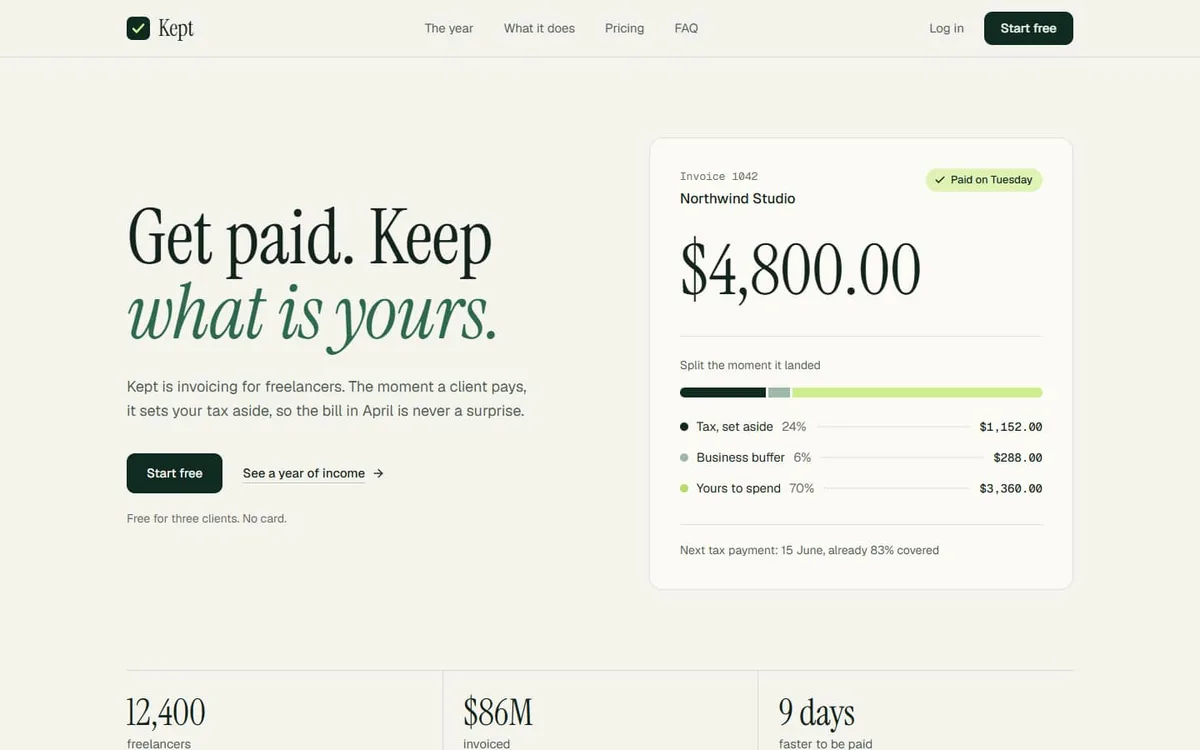
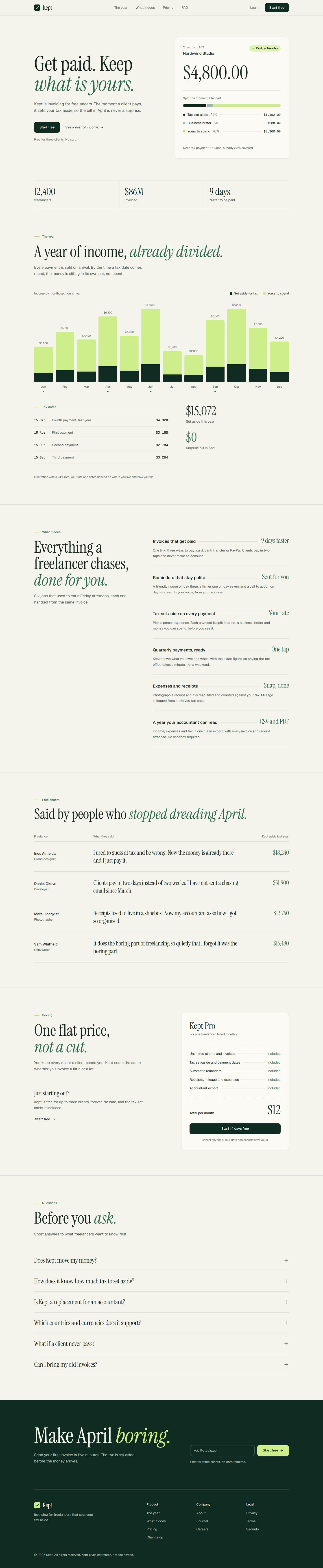
A calm, statement-style landing page for invoicing and tax tools: a hero built as an invoice that was just paid, a twelve-month chart drawn from your own numbers, a dotted-leader feature ledger and a receipt for a price.
- Made for
- Invoicing tools, Accounting apps, Freelancer finance
- Highlights
- Hero built as an invoice that was just paid
- Year chart calculated from your own figures
- Dotted-leader ledger and receipt-style pricing
- One config file and one colour palette
- The look
- Warm paper, a deep pine ink and one fresh lime. Headlines are set in a condensed serif with an italic green accent, and every amount uses tabular figures so columns line up. There are no shadows and no gradients: depth comes from hairlines and a slightly lighter sheet colour.
Sections
- 01
Hero
An invoice that was just paid, split into tax, buffer and spend, with three headline figures.
- 02
The year
A twelve-month chart with tax dates, calculated from your figures.
- 03
What it does
A ledger of six features along dotted leaders.
- 04
Quotes
Customer quotes set as a table.
- 05
Pricing
One plan, laid out as a receipt.
- 06
FAQ
Common questions, answered in place.
- 07
Closing sign-up
A sign-up block on the pine band, with the footer.
Remove a section by deleting its line in app/page.tsx, or move the line to reorder.
Built with
Its motion comes from free components in our library, shipped in components/hairline/ so you can use them anywhere else on the page too.
Make it yours
Every word, link and price lives in site.config.ts. TypeScript flags a missing or misspelled field, so you can’t quietly break a section.
| To change | Edit |
|---|---|
| All copy, links, prices, figures, FAQ | site.config.ts |
| Colours | app/globals.css (@theme) |
| Fonts | app/layout.tsx |
| Currency and number format | lib/money.ts |
| Which sections appear, and in what order | app/page.tsx |
Run it
$ npm install$ npm run devNode.js 18.18 or newer. No environment variables.
Before you go live
The form in components/sections/FinalCta.tsx only shows a confirmation message, so connect its onSubmit to your own sign-up flow. Replace the demo customers, figures and tax details with your own, and have a professional check any tax claims you make.
Specifications
- Framework
- Next.js 15 (App Router), React 19
- Language
- TypeScript
- Styling
- Tailwind CSS v4 with design tokens and component styles
- Fonts
- Instrument Serif, Geist, Geist Mono, self-hosted with next/font
- Dependencies
- next, react, react-dom, lucide-react, clsx, tailwind-merge
- Images
- None. Every visual is built in code.
- API keys and environment variables
- None
- Node.js
- 18.18 or newer
- Colour scheme
- Light
- Responsive
- Desktop, tablet and phone
- Accessibility
- Skip link, visible focus, keyboard navigation, reduced motion
- Deploys to
- Vercel, Netlify, Cloudflare Pages or any Node host
- Codebase
- 18 source files, about 1,200 lines
- Last updated
- Oct 7, 2026
License
One license, no tiers. The full text ships as LICENSE.md in the download.
You can
- Use it for your own products
- Use it for any number of client projects
- Change the code and design however you like
- Deploy the result commercially
You can’t
- Resell or share the files as a template, theme or UI kit
- Publish the source as a template in a public repository
Questions
What do I get when I buy Kept?
The complete Kept project as a download: the Next.js app, its config file, a README with setup and customisation notes, and the license. The download link arrives right after checkout.
Can I use Kept for client projects?
Yes. One purchase covers your own products and any number of client projects, and you can change the code however you like. What you can’t do is resell or share the template files themselves as a template or UI kit.
Do I need API keys, a database or a backend?
No. It runs with npm install and npm run dev and deploys to Vercel, Netlify or Cloudflare Pages without any environment variables.
What should I change before I launch?
The form in components/sections/FinalCta.tsx only shows a confirmation message, so connect its onSubmit to your own sign-up flow. Replace the demo customers, figures and tax details with your own, and have a professional check any tax claims you make.
Do I need to know Next.js?
Basic React helps, but most changes are text edits in site.config.ts. The README walks through colours, fonts and section order.
How do updates work?
Updates to Kept are free. When a new version ships, download it again from the link in your order email.
Can I get a refund?
Yes. If Kept isn’t right for you, reply to your receipt within 14 days and you get your money back.
Should I buy all-access instead?
If you’ll use more than two templates, yes. All-access is $99 for all 17 templates, including Kept and every template added later. Three single templates would cost $117.
All-access
All 17 templates for $99.
Every template in the library, including Kept, and every one added later. Same license, free updates. Less than three single templates.