Loupe: Designer and developer portfolio template for Next.js.
- Next.js 16
- CSS
- TypeScript
- 7 sections
- Light
- No API keys
- Palette
- Updated Oct 24, 2026
01Overview
At a glance
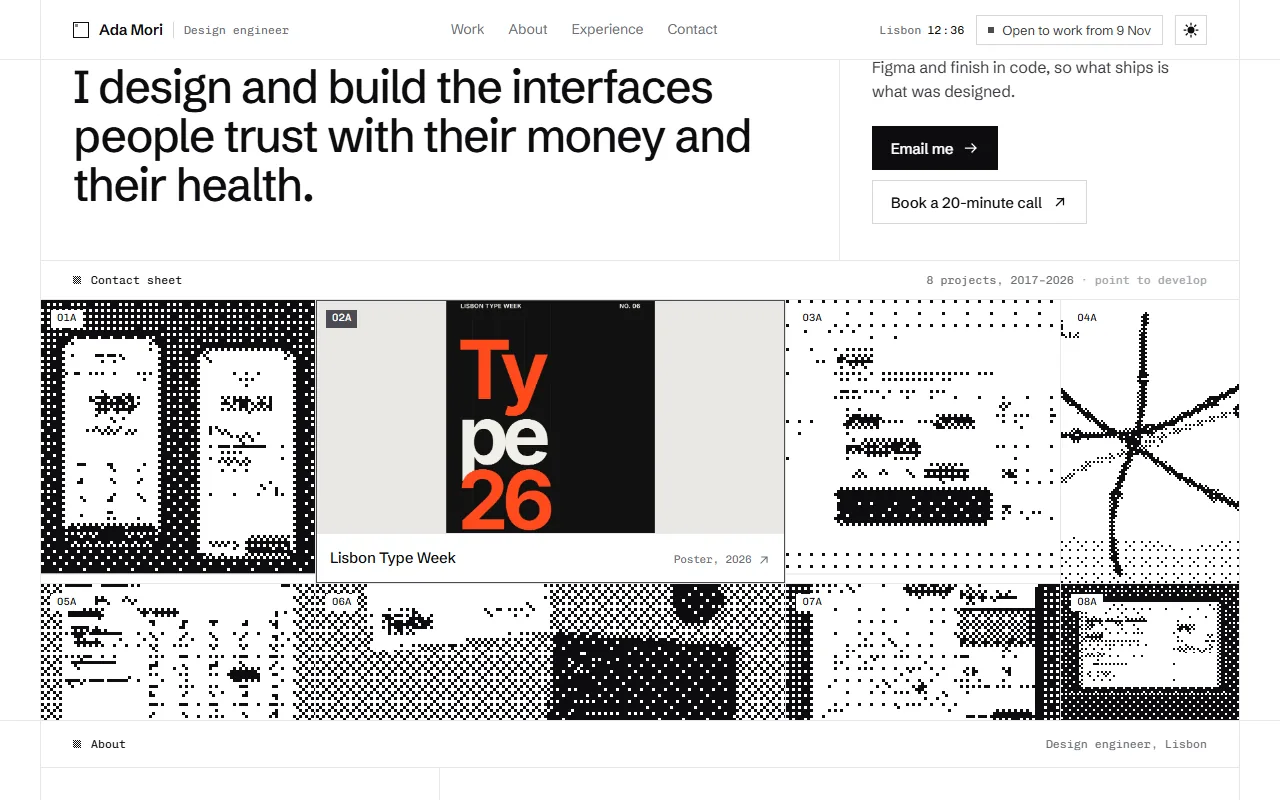
A personal portfolio that looks like a photographer's contact sheet. Every picture on the page starts as a print in dither, drawn live from your own images in the page's ink, and develops into the photograph when someone looks at it. Underneath, it's a fast, plain portfolio: who you are, all your work at once, a case study for each project, your experience and how to reach you.
Made for
- Product designers and design engineers showing screens and case studies
- Developers and indie makers who want a portfolio people remember
- Anyone with a body of work that reads well as a sheet of frames
- All the work on one contact sheet: frames print in dither, and the one you point at swells and develops into the photograph
- A portrait with a loupe that develops whatever it passes over, and a tap that develops the whole print on phones
- A darkroom sweep of fine dither for page changes and the light/dark switch
- A case study page for every project, a live clock, an availability calendar and dither drawn from your own pictures
02The look
Its own palette and type
The colours and type it ships with. Tap a colour to copy it.
- AaSchibsted GroteskIncluded with the template
The quick brown fox jumps over the lazy dog
0123456789
- AaChivo MonoIncluded with the template
The quick brown fox jumps over the lazy dog
0123456789
Black ink on white paper with hairlines and greys, nothing else: Schibsted Grotesk for words and Chivo Mono for dates and figures. Everything that has tone is dither: the prints, the bars of the experience chart, the booked weeks, the section marks, even the edge of a button's fill. The only colour on the page is your own work, when it develops. In dark mode the prints become negatives.
03Sections
7 sections, in page order
From the first screen to the footer.
- 01
Hero and contact sheet
Your name, a one-line headline and two actions beside every project on one sheet. The frames print in dither one after another as the page opens; the one under the pointer swells, its neighbours give way, and its print develops into the photograph with its title. Tap twice on phones; Tab and Enter with a keyboard.
- 02
About
A portrait printed in dither with a round loupe that shows the photograph wherever it passes, a few paragraphs and a short "Now" list of what you're building, learning and reading.
- 03
Experience and tools
Every role on one calendar of years, as bars of dither (the current role crawls), each opening into what it was and what came of it. Tools with what they're for and a strip of one dither cell per year of use.
- 04
Kind words
Three quotes whose faces are dithered prints that develop while you read them.
- 05
Contact
An email that copies itself, a live clock where you live with a line on whether you're at your desk, your socials, and the next few months: booked weeks in dither and a crawling slot where the next project could start.
- 06
Footer
Your name as wide as the page, set in dither that a slow band of light moves through; the pointer is a second light.
- 07
Case studies and 404
A page for every project with its cover developing as it opens, the process pictures, the story, figures and a next project that develops under the pointer. A 404 in dithered type.
04Make it yours
Where everything lives
Everything a visitor reads lives in one config file. Every project needs a cover, a title, a type, a year and a summary; role, team, links, process pictures, the story and the figures are optional and simply not shown when they're missing. The dithered prints are drawn from your normal pictures in the browser, so there's nothing extra to make.
| To change | Edit |
|---|---|
| Name, role, city, time zone, email, availability, socials | site.config.ts |
| Projects and their case studies | site.config.ts → projects |
| About, experience, tools, kind words, contact | site.config.ts |
| Ink, paper, the live grey and type | styles/base.css, app/layout.tsx |
| How the dither draws | lib/dither.ts, components/dither/ |
| Section order | app/page.tsx |
Run it
$ npm install$ npm run devNode.js 20.9 or newer. No environment variables.
Before you go live
Set your name, email, city, time zone, openFrom and socials in site.config.ts, replace the projects, portrait and quotes with your own, set site.url so social previews work, and run npm run verify:content.
05Specifications
What’s under the hood
- sections
- 7
- source files
- 71
- lines of code
- ~3,700
- dependencies
- 3
- API keys needed
- 0
Stack
- Framework
- Next.js 16 (App Router), React 19
- Language
- TypeScript
- Styling
- CSS with design tokens and component styles
- Dependencies
nextreactreact-dom
Design
- Fonts
- Schibsted Grotesk, Chivo Mono, self-hosted with next/font
- Images
- Eight project covers (a transfer app, a festival poster, a design system, a tram map, clinic booking, a ceramics identity, a field notebook and a loan application), pencil-sketch and wireframe versions of five of them, a portrait, three faces for the quotes and a social preview. Every dithered print, the loupe, the darkroom sweep, the grain and the dithered type are drawn in the browser.
- Colour scheme
- Light
- Responsive
- Desktop, tablet and phone
Quality
- Accessibility
- Skip link, visible focus, keyboard navigation, reduced motion
- API keys and environment variables
- None
- Node.js
- 20.9 or newer
Shipping
- Deploys to
- Vercel, Netlify, Cloudflare Pages or any Node host
- Codebase
- 71 source files, about 3,700 lines
- Last updated
- Oct 24, 2026
06License
One license, no tiers
The full text ships as LICENSE.md in the download and is on the license page.
You can
- Use it for your own products
- Use it for any number of client projects
- Change the code and design however you like
- Deploy the result commercially
You can’t
- Resell or share the files as a template, theme or UI kit
- Publish the source as a template in a public repository
07Questions
Before you start
What do I get with Loupe?
The complete Loupe project as a download: the Next.js app, its config file, a README with setup and customisation notes, and the license. It’s free: press Get, sign in with a free account, and it’s added to your library to download. No card needed.
Can I use Loupe for client projects?
Yes. The free templates use the same commercial license as the paid ones: your own products and any number of client projects, and you can change the code however you like. What you can’t do is resell or share the template files themselves as a template or UI kit.
Do I need API keys, a database or a backend?
No. It runs with npm install and npm run dev and deploys to Vercel, Netlify or Cloudflare Pages without any environment variables.
What should I change before I launch?
Set your name, email, city, time zone, openFrom and socials in site.config.ts, replace the projects, portrait and quotes with your own, set site.url so social previews work, and run npm run verify:content.
Do I need to know Next.js?
Basic React helps, but most changes are text edits in site.config.ts. The README walks through colours, fonts and section order.
How do updates work?
Updates to Loupe are free. When a new version ships, download it again from your account.
Why is Loupe free?
So you can see the standard of every template in the library before you pay for one. Loupe is complete, with nothing held back. If you want the rest, all-access is $149 for all 46 templates.
08All-access
Every template, one price
All 46 templates for $149.
Every template in the library, including Loupe, and every one added later. Same license, free updates. Less than three single templates.