Tempo: Mobile app landing page template for Next.js.
- Next.js 16
- Tailwind CSS v4
- TypeScript
- 9 sections
- Light
- No API keys
- Palette
- Updated Oct 8, 2026
01Overview
At a glance
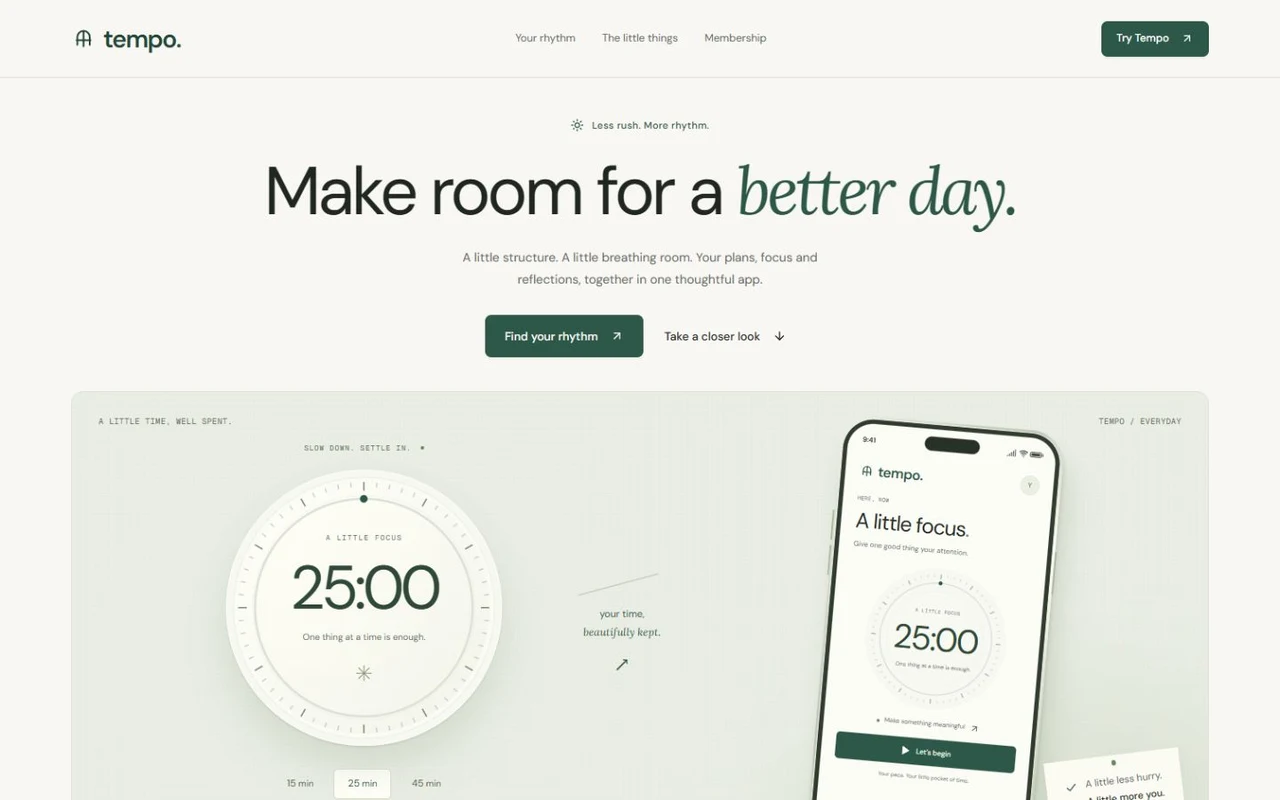
A sophisticated light launch page for mobile apps and everyday consumer tools. A tactile focus dial, interactive phone screens and distinct editorial sections combine warm paper, pale sage and forest green.
Made for
- Habit and routine apps
- Journals and reading apps
- Personal planners and consumer tools
What stands out04
- Real focus timer synchronized with the phone preview
- Plan, Focus and Reflect screens with screenshot replacements
- Saved reflections, routine controls and a sample-week explorer
- Paper-and-sage design with configurable content and pricing
02The look
Its own palette and type
The colours and type it ships with. Tap a colour to copy it.
- AaDM SansIncluded with the template
The quick brown fox jumps over the lazy dog
0123456789
- AaLoraIncluded with the template
The quick brown fox jumps over the lazy dog
0123456789
- AaGeist MonoIncluded with the template
The quick brown fox jumps over the lazy dog
0123456789
Warm white and charcoal with sage surfaces and forest-green accents. DM Sans display and interface type, Lora italic accents and Geist Mono details. A coded device frame and physical-looking dial anchor the page; original CSS/SVG illustrations keep every visual editable.
03Sections
9 sections, in page order
From the first screen to the footer.
- 01
Navigation
Anchor links, a mobile menu and a working app-preview action.
- 02
Hero
A compact editorial headline above a tactile dial and interactive phone. A real timer supports duration selection, pause, resume and reset.
- 03
Product chapters
Plan, Focus and Reflect tabs coordinate the copy and phone screens. Shared routine controls and saved reflections work across previews.
- 04
Daily timeline
A forest-green sequence of original morning, focus and reflection illustrations, vertical on phones.
- 05
Thoughtful details
An interactive sample-week explorer, synchronized pace controls and a quiet leaf composition.
- 06
Everyday stories
Three spacious editable story cards, explicitly labeled as illustrative.
- 07
Membership
Two plans, computed annual savings and plan buttons that go to checkout or your email.
- 08
FAQ
Native disclosures explaining the preview, storage and buyer integrations.
- 09
Closing and footer
An original app icon in concentric rings, app-preview action and footer navigation.
04Make it yours
Where everything lives
Every word, link and price lives in site.config.ts. TypeScript flags a missing or misspelled field, so you can’t quietly break a section.
| To change | Edit |
|---|---|
| Brand, primary copy, routines, stories, plans, FAQ and destinations | site.config.ts |
| Drop-in app screenshots | site.config.ts → screens |
| Palette and shared typography | styles/base.css |
| Fonts and metadata | app/layout.tsx |
| Section order | app/page.tsx |
| Section headlines and microcopy | components/sections/ |
| App interface and local interactions | components/app/ and lib/ |
Run it
$ npm install$ npm run devNode.js 20.9 or newer. No environment variables.
Before you go live
Set links.ios, links.android, optional links.app, links.email and each plan’s href in site.config.ts. Replace the fictional brand, stories, membership features and sample data. The timer is local, routines are current-page state and reflections save only in this browser; connect your actual app and checkout separately.
05Specifications
What’s under the hood
- sections
- 9
- source files
- 42
- lines of code
- ~4,900
- dependencies
- 4
- API keys needed
- 0
Stack
- Framework
- Next.js 16 (App Router), React 19
- Language
- TypeScript
- Styling
- Tailwind CSS v4 with design tokens and component styles
- Dependencies
nextreactreact-domlucide-react
Design
- Fonts
- DM Sans, Lora, Geist Mono, self-hosted with next/font
- Images
- No external photography or image licenses. Device, dial, app screens and illustrations are original HTML/CSS/SVG. App screenshot slots are available.
- Colour scheme
- Light
- Responsive
- Desktop, tablet and phone
Quality
- Accessibility
- Skip link, visible focus, keyboard navigation, reduced motion
- API keys and environment variables
- None
- Node.js
- 20.9 or newer
Shipping
- Deploys to
- Vercel, Netlify, Cloudflare Pages or any Node host
- Codebase
- 42 source files, about 4,900 lines
- Last updated
- Oct 8, 2026
06License
One license, no tiers
The full text ships as LICENSE.md in the download and is on the license page.
You can
- Use it for your own products
- Use it for any number of client projects
- Change the code and design however you like
- Deploy the result commercially
You can’t
- Resell or share the files as a template, theme or UI kit
- Publish the source as a template in a public repository
07Questions
Before you start
What do I get with Tempo?
The complete Tempo project as a download: the Next.js app, its config file, a README with setup and customisation notes, and the license. It’s free: press Get, sign in with a free account, and it’s added to your library to download. No card needed.
Can I use Tempo for client projects?
Yes. The free templates use the same commercial license as the paid ones: your own products and any number of client projects, and you can change the code however you like. What you can’t do is resell or share the template files themselves as a template or UI kit.
Do I need API keys, a database or a backend?
No. It runs with npm install and npm run dev and deploys to Vercel, Netlify or Cloudflare Pages without any environment variables.
What should I change before I launch?
Set links.ios, links.android, optional links.app, links.email and each plan’s href in site.config.ts. Replace the fictional brand, stories, membership features and sample data. The timer is local, routines are current-page state and reflections save only in this browser; connect your actual app and checkout separately.
Do I need to know Next.js?
Basic React helps, but most changes are text edits in site.config.ts. The README walks through colours, fonts and section order.
How do updates work?
Updates to Tempo are free. When a new version ships, download it again from your account.
Why is Tempo free?
So you can see the standard of every template in the library before you pay for one. Tempo is complete, with nothing held back. If you want the rest, all-access is $159 for all 63 templates.
08All-access
All 63 templates for $159. And every one added later.
Every template in the library, including Tempo. Same license, free updates, and less than 5 single templates would cost.
63 templates today$2.52 each
7 more and it’s $169. Buy today and every one after is yours at $159.
09More templates