Fleck: SaaS product landing page template for Next.js.
- Next.js 16
- CSS
- TypeScript
- 9 sections
- Dark
- No API keys
- Palette
- Updated Nov 3, 2026
01Overview
At a glance
A complete launch page for a new SaaS or developer product. Instead of listing features, it follows one piece of work through the product: asked for, assigned, worked on, approved, shipped. The example moves tasks; yours can move tickets, orders, requests or deploys, and you change the words and lists in one file.
Made for
- Developer tools, AI agent products and workflow software
- B2B SaaS where work moves through stages
- Founders launching a new product who want a page that shows it working
What stands out04
- One task followed down the page, with the header's five squares showing the stage it has reached
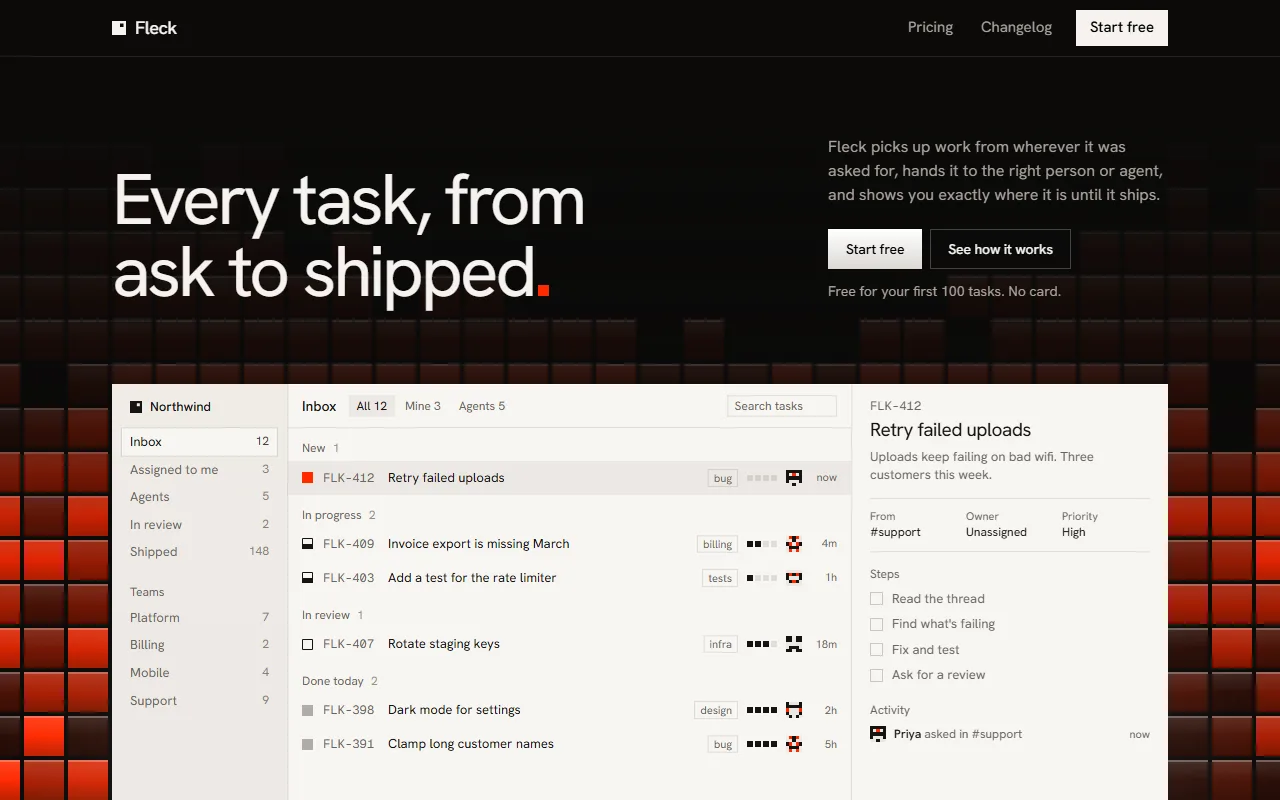
- A wall of lit tiles where every square is a piece of work, and a light app window that works through its own rows
- Demos that play by themselves: requests routed into an inbox, work riding a rail onto whoever has room, a run with a live diff, an approval, a printed record
- Plans drawn to scale, and a last full stop that grows until the signal colour fills the screen
02The look
Its own palette and type
The colours and type it ships with. Tap a colour to copy it.
- AaHanken GroteskIncluded with the template
The quick brown fox jumps over the lazy dog
0123456789
- AaGeist MonoIncluded with the template
The quick brown fox jumps over the lazy dog
0123456789
Hanken Grotesk at restrained sizes, with Geist Mono for ids and code. Warm near-black with one signal colour, vermilion, which only ever means the task or the final takeover. One material runs through the page: a square tile lit from above, used for the wall behind the hero, the stacks on the rail, the approval and the plans. Hard square corners throughout. The only white surfaces are the app window, the inbox and the printed record, so they read as lit. All motion is slow and soft, and nothing needs a press to play.
03Sections
9 sections, in page order
From the first screen to the footer.
- 01
Hero
"Every task, from ask to shipped." over a wall of lit tiles. The full stop falls into the app window below and lands as the first row. The window works through its own rows; new squares glow up slowly in the wall. Or show a picture of your own app.
- 02
It starts wherever someone asks
Five requests in five shapes (email, API, pull request, form, chat). One at a time a square travels a line into a single inbox and comes in as a row.
- 03
It goes to whoever has room
Stacks of open work hanging from a machined rail. New work rides the rail and comes down the cable onto whoever has the least, while finished tiles leave the tallest stack.
- 04
Then you can watch it happen
A run panel: steps on the left, a code diff writing itself on the right, a check that fails and gets fixed, and a clock.
- 05
Nothing ships until someone says so
The task as one large lit tile. Checks tick in, and colour rises slowly through the tile and onto the floor beneath it.
- 06
And everyone who asked hears back
A task record prints out of a machined slot, and the answers go back to where each question came from.
- 07
Details, plans, quotes, questions
A plain list of the rest; plans drawn to scale, where each square is the same number of tasks; one large quote at a time; every question already open.
- 08
Your turn
The last full stop on the page grows with the scroll until the signal colour fills the screen, with the tile wall rising from the floor, a start button and an install command.
- 09
Pages
A changelog, privacy and terms placeholders and a 404, in the same type.
04Make it yours
Where everything lives
Every word, list and number lives in site.config.ts, starting with the one item the page follows and its five stages. The colour is one line, and the wall, the line, the task and the ending all follow it. npm run verify:content checks that what you changed still fits.
| To change | Edit |
|---|---|
| The thing the page follows, and its stages | site.config.ts → item, stages |
| Headline, app window and its rows | site.config.ts → hero, app |
| Your own product screenshot in the hero | site.config.ts → hero.screen |
| Each stage's words and lists | site.config.ts → asked, assigned, working, review, shipped |
| Plans, quotes, questions and links | site.config.ts → pricing, voices, faq, links |
| The signal colour | styles/tokens.css → --signal |
| The shape of the tile wall | lib/field.ts |
| Section order, and where the line runs | app/page.tsx |
Run it
$ npm install$ npm run devNode.js 20.9 or newer. No environment variables.
Before you go live
Set links.start (every start button uses it), links.email and url in site.config.ts, replace the example product's words, people, quotes and prices, and have the privacy and terms placeholders rewritten.
05Specifications
What’s under the hood
- sections
- 9
- source files
- 60
- lines of code
- ~4,800
- dependencies
- 3
- API keys needed
- 0
Stack
- Framework
- Next.js 16 (App Router), React 19
- Language
- TypeScript
- Styling
- CSS with design tokens and component styles
- Dependencies
nextreactreact-dom
Design
- Fonts
- Hanken Grotesk, Geist Mono, self-hosted with next/font
- Images
- No photos or image files apart from the favicon. The tile wall, app window, rail, run panel, approval tile, record and icons are HTML, CSS and SVG. To show your real app in the hero, add one 1920 × 1200 picture.
- Colour scheme
- Dark
- Responsive
- Desktop, tablet and phone
Quality
- Accessibility
- Skip link, visible focus, keyboard navigation, reduced motion
- API keys and environment variables
- None
- Node.js
- 20.9 or newer
Shipping
- Deploys to
- Vercel, Netlify, Cloudflare Pages or any Node host
- Codebase
- 60 source files, about 4,800 lines
- Last updated
- Nov 3, 2026
06License
One license, no tiers
The full text ships as LICENSE.md in the download and is on the license page.
You can
- Use it for your own products
- Use it for any number of client projects
- Change the code and design however you like
- Deploy the result commercially
You can’t
- Resell or share the files as a template, theme or UI kit
- Publish the source as a template in a public repository
07Questions
Before you buy
What do I get when I buy Fleck?
The complete Fleck project as a download: the Next.js app, its config file, a README with setup and customisation notes, and the license. It’s added to your account’s library the moment payment goes through.
Can I use Fleck for client projects?
Yes. One purchase covers your own products and any number of client projects, and you can change the code however you like. What you can’t do is resell or share the template files themselves as a template or UI kit.
Do I need API keys, a database or a backend?
No. It runs with npm install and npm run dev and deploys to Vercel, Netlify or Cloudflare Pages without any environment variables.
What should I change before I launch?
Set links.start (every start button uses it), links.email and url in site.config.ts, replace the example product's words, people, quotes and prices, and have the privacy and terms placeholders rewritten.
Do I need to know Next.js?
Basic React helps, but most changes are text edits in site.config.ts. The README walks through colours, fonts and section order.
How do updates work?
Updates to Fleck are free. When a new version ships, download it again from your library.
Can I get a refund?
Before you download it, yes: email support@hairlineui.com within 14 days and you get your money back, no reason needed. After you download, if Fleck doesn’t work as described, we fix it, and if we can’t, we refund it. A change of mind after downloading isn’t refunded, because you keep the code, so try the live demo first: it’s the whole template.
Should I buy all-access instead?
If you’ll use 5 or more templates, yes. All-access is $159 for all 61 templates, including Fleck and every template added later; 5 single templates would cost $195. The price rises as the library grows: 9 more templates and it goes to $169.
08All-access
All 61 templates for $159. And every one added later.
Every template in the library, including Fleck. Same license, free updates, and less than 5 single templates would cost.
61 templates today$2.61 each
9 more and it’s $169. Buy today and every one after is yours at $159.
09More templates
More templates for AI products
Compare Fleck side by side with the other templates for saas landing pages and developer tools.