Houselight: Ticketing landing page template for Next.js.
$39one-time payment
- Next.js 16
- CSS
- TypeScript
- 10 sections
- Dark
- No API keys
- Palette
- Updated Nov 15, 2026
01Overview
At a glance
A complete launch page for a product that sells tickets: a box office, a seat-map platform, or ticketing for venues, promoters and festivals. The example sells seated shows in a large hall; yours can sell concerts, comedy, theatre, conferences or festivals, and you change the venue, words and numbers in one file.
Made for
- Ticketing platforms and box office software
- Event, venue and promoter tools with seat maps or queues
- Festival, conference and tour products that sell on the night
What stands out04
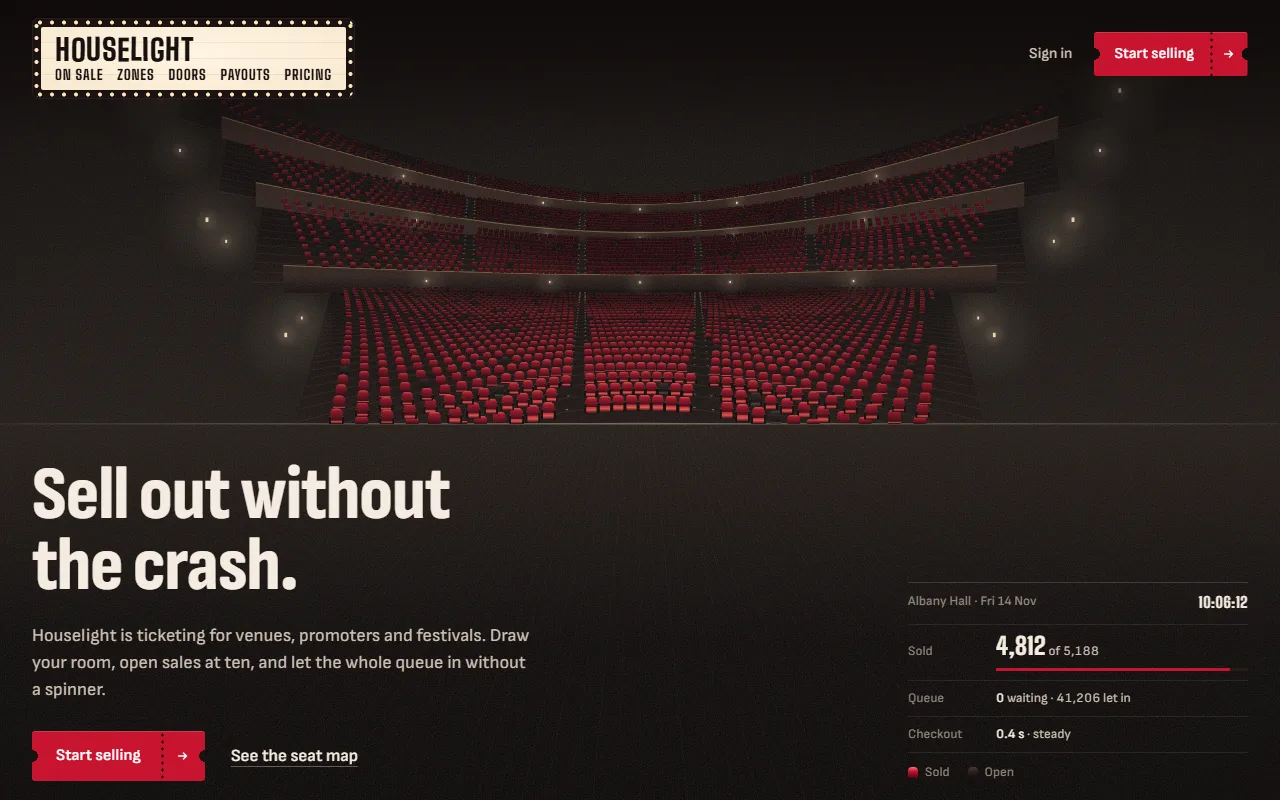
- A first screen of 5,188 seats seen from the stage that sell out in a velvet wave, with a live readout of tickets sold, the queue and the clock
- A queue chart drawn from people and seats, a plan of pricing zones whose prices step as they fill, and door scans seating people on the map
- The night's settlement in a daylight band, a presale lighting past buyers' seats seen from the back of the house, and a box office price board
- A marquee board for a header, a ticket for a footer, the house lights coming up at the end, and no animation library
02The look
Its own palette and type
The colours and type it ships with. Tap a colour to copy it.
- AaBig ShouldersIncluded with the template
The quick brown fox jumps over the lazy dog
0123456789
- AaSofia Sans CondensedIncluded with the template
The quick brown fox jumps over the lazy dog
0123456789
- AaSofia SansIncluded with the template
The quick brown fox jumps over the lazy dog
0123456789
A dark, warm house lit from the stage. Big Shoulders sets the marquee letters and the big figures, Sofia Sans Condensed the headings, Sofia Sans the text. One signal colour, velvet red, means one thing: a seat that's sold, and the button that sells it. Every seat map is drawn on canvas from the same venue, seen from the stage, from above, close up and from the back of the house, with brass seat plates marking each section and a single daylight band for the morning the money lands.
03Sections
10 sections, in page order
From the first screen to the footer.
- 01
Header
A small marquee board: a lit panel in a frame of bulbs that light in one sweep, the name in changeable letters and the links on its lower line. On a phone the board grows a line per link.
- 02
First screen
"Sell out without the crash." on the stage, in its light, with the house rising behind: stalls, three balconies, lamps on the balcony fronts and sconces on the walls. Sales open on load and the seats turn velvet in a wave from the front rows out while the readout counts 4,812 sold, the clock rolls and the queue drains.
- 03
On sale
The queue as a rendered chart: people stacked minute by minute, rising to forty thousand at ten and draining at an even pace while the tickets sold stack up below.
- 04
Pricing zones
The hall as a plan from above, painted in five zones. Each zone's floor warms as it fills and its price rolls on the map and in the list when its rule fires, up for the front stalls, down for a slow gallery.
- 05
Doors
A door scanner beside the front rows: each scan names a seat and someone sits down in it, while the count of people in climbs.
- 06
Payouts
The page's one daylight band: the night from doors to sunrise along a strip, and the settlement, whose total rolls in at 06:12.
- 07
Repeat fans
The next show from the back of the house, its stage framed in velvet curtains. Past buyers' seats light up across the map in the presale, three regulars named where they sit.
- 08
Pricing and questions
A box office board of three marquee panels with the prices in changeable letters, the featured one in red, then every answer open beside a brass seat plate.
- 09
The close and footer
The first screen's view again with every seat sold as the house lights come up, then a footer printed on a ticket with a velvet stub.
- 10
Pages
Privacy and terms placeholders and a 404, between the marquee and the ticket.
04Make it yours
Where everything lives
Every word, number and link lives in site.config.ts, and every seat map is drawn from its house block: change the tiers and the number sold and the whole page redraws. npm run verify:content checks that what you changed still fits, from the room having enough seats to the statement adding up.
| To change | Edit |
|---|---|
| Venue, tiers and tickets sold | site.config.ts → house |
| Headline, pitch and the on-sale readout | site.config.ts → hero |
| Queue, zones, doors, payouts and the presale | site.config.ts → sale, zones, doors, payouts, fans |
| Price board, questions, close and footer | site.config.ts → pricing, faq, closing, footer |
| Velvet, the house and the light | styles/tokens.css, lib/palette.ts |
| Privacy, terms and 404 copy | data/pages.ts |
| Section order | app/page.tsx |
Run it
$ npm install$ npm run devNode.js 20.9 or newer. No environment variables.
Before you go live
Set links and brand.url in site.config.ts, replace the example venue, figures, people and prices, and have the privacy and terms pages in data/pages.ts written for your product.
05Specifications
What’s under the hood
- sections
- 10
- source files
- 46
- lines of code
- ~5,100
- dependencies
- 3
- API keys needed
- 0
Stack
- Framework
- Next.js 16 (App Router), React 19
- Language
- TypeScript
- Styling
- CSS with design tokens and component styles
- Dependencies
nextreactreact-dom
Design
- Fonts
- Big Shoulders, Sofia Sans Condensed, Sofia Sans, self-hosted with next/font
- Images
- None. The venue, its seats and people, the charts, the scanner, the marquee and the ticket are drawn in HTML, CSS, SVG and canvas.
- Colour scheme
- Dark
- Responsive
- Desktop, tablet and phone
Quality
- Accessibility
- Skip link, visible focus, keyboard navigation, reduced motion
- API keys and environment variables
- None
- Node.js
- 20.9 or newer
Shipping
- Deploys to
- Vercel, Netlify, Cloudflare Pages or any Node host
- Codebase
- 46 source files, about 5,100 lines
- Last updated
- Nov 15, 2026
06License
One license, no tiers
The full text ships as LICENSE.md in the download and is on the license page.
You can
- Use it for your own products
- Use it for any number of client projects
- Change the code and design however you like
- Deploy the result commercially
You can’t
- Resell or share the files as a template, theme or UI kit
- Publish the source as a template in a public repository
07Questions
Before you buy
What do I get when I buy Houselight?
The complete Houselight project as a download: the Next.js app, its config file, a README with setup and customisation notes, and the license. It’s added to your account’s library the moment payment goes through.
Can I use Houselight for client projects?
Yes. One purchase covers your own products and any number of client projects, and you can change the code however you like. What you can’t do is resell or share the template files themselves as a template or UI kit.
Do I need API keys, a database or a backend?
No. It runs with npm install and npm run dev and deploys to Vercel, Netlify or Cloudflare Pages without any environment variables.
What should I change before I launch?
Set links and brand.url in site.config.ts, replace the example venue, figures, people and prices, and have the privacy and terms pages in data/pages.ts written for your product.
Do I need to know Next.js?
Basic React helps, but most changes are text edits in site.config.ts. The README walks through colours, fonts and section order.
How do updates work?
Updates to Houselight are free. When a new version ships, download it again from your library.
Can I get a refund?
Before you download it, yes: email support@hairlineui.com within 14 days and you get your money back, no reason needed. After you download, if Houselight doesn’t work as described, we fix it, and if we can’t, we refund it. A change of mind after downloading isn’t refunded, because you keep the code, so try the live demo first: it’s the whole template.
Should I buy all-access instead?
If you’ll use 5 or more templates, yes. All-access is $159 for all 61 templates, including Houselight and every template added later; 5 single templates would cost $195. The price rises as the library grows: 9 more templates and it goes to $169.
08All-access
All 61 templates for $159. And every one added later.
Every template in the library, including Houselight. Same license, free updates, and less than 5 single templates would cost.
61 templates today$2.61 each
9 more and it’s $169. Buy today and every one after is yours at $159.
09More templates