Plinth: Electronics product landing page template for Next.js.
$39one-time payment
- Next.js 16
- CSS
- TypeScript
- 9 sections
- Dark
- No API keys
- Palette
- Updated Oct 30, 2026
01Overview
At a glance
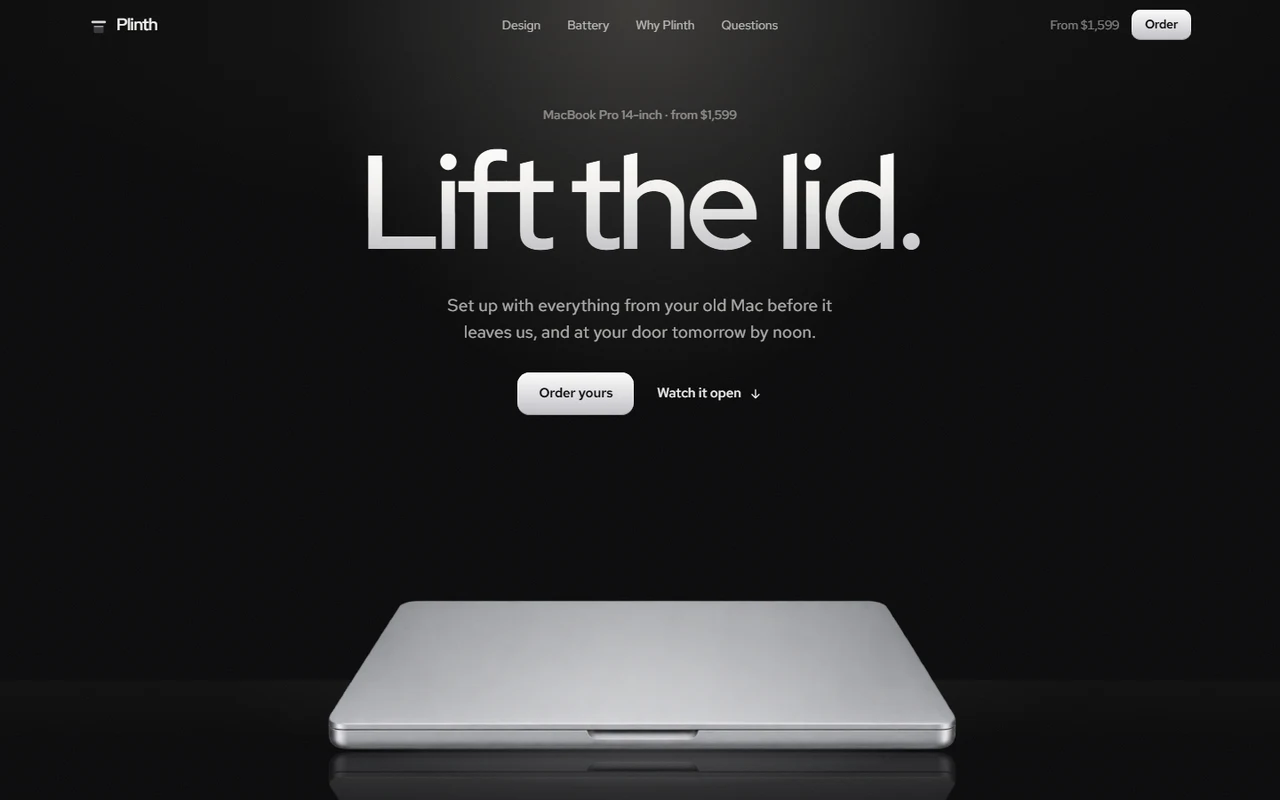
A complete landing page for Plinth, an independent Mac shop selling the MacBook Pro 14-inch in three builds and two finishes, set up with the buyer's old Mac before it ships and delivered the next day. The page opens the machine, walks around it and closes it again; every photograph, spec, port, build and price comes from one product file, and the spots the motion lines up with (the screen, the ports, the charging light) are measured there too.
Made for
- Shops and makers selling a single device or a small range: laptops, phones, headphones, cameras, speakers
- Hardware startups launching their own product
- Resellers who add a service to the box: set-up, delivery, trade-in, care
What stands out04
- A pinned hero where the lid opens, the screen wakes and the camera zooms into it until it fills the window
- A pinned tour along the side of the product, stopping at each port with what it's for
- Charging light, battery count, finishes stepping apart and a lid that closes onto the page, all driven by scroll
- Free engraving typed live onto the lid, a delivery countdown from the visitor's clock, and Order links that carry the build
02The look
Its own palette and type
The colours and type it ships with. Tap a colour to copy it.
- AaRed Hat DisplayIncluded with the template
The quick brown fox jumps over the lazy dog
0123456789
- AaRed Hat TextIncluded with the template
The quick brown fox jumps over the lazy dog
0123456789
Dark only: a studio where the product is lit like a sculpture and every screen is on, throwing its wallpaper's colour on the room around it; a spotlight and a glossy floor that reflects the laptop, warm and cool rim lights, film grain, and tiles lit from inside. Headings and figures take the light like metal. Red Hat Display for headings and huge light-weight figures, Red Hat Text for reading. Buttons are machined aluminium. One signal colour, the amber of the charging light, means power and ready. Scroll motion rides a spring, so wheel steps arrive as one smooth movement.
03Sections
9 sections, in page order
From the first screen to the footer.
- 01
Hero
Pinned: the closed laptop under a spotlight on a glossy floor. Scrolling, the lid rises with a line of light on its edge, the screen wakes on "Welcome back, Ana. Everything from your old Mac is here." and throws its colour on the room, the camera goes into the screen until it fills the window, and the display climbs to full HDR brightness as 1,000 rolls to 1,600 nits.
- 02
Design
Pinned: the side profile lies across the window in front of its thickness, written huge; the camera zooms to the edge and travels along it, stopping at MagSafe, both Thunderbolt ports and the headphone jack, each named just above it.
- 03
Battery
The charging plug in the edge: its light turns amber, the hours count up to 24 and the room fills with its warm light as you scroll.
- 04
Finishes
Silver and space black arrive as one laptop on a glossy floor, then the second steps out from behind the first, each screen lit in its own colour.
- 05
Why Plinth
Tiles lit from inside: the laptop from above switched on (set-up in 2 h 14 min), a live ring counting down to today's courier, the old Mac that comes off the price, the new one leaving with its screen glowing behind the lid, and a buyer's quote with the number of machines delivered.
- 06
Order
The three builds as lit tiles, each with the laptop switched on in its own colour: who it suits, chip, memory and storage on shared lines, price and monthly price, and an Order button that carries the build to checkout.
- 07
Questions
Sealed, set-up, the cutoff, trade-in, returns and engraving, every answer visible in two columns.
- 08
Close
The lid swings shut onto the page as you arrive. Type an engraving and it's etched into the lid; the Order button carries it, and a countdown from the visitor's own clock says how long is left to order for tomorrow.
- 09
Pages
Delivery and returns, privacy and terms, and a 404.
04Make it yours
Where everything lives
Every heading, paragraph, promise, question and link lives in site.config.ts; the product (photographs, specs, ports, finishes, builds and prices) and the measured spots inside each photograph live in data/mac.ts. npm run verify:content checks them against each other.
| To change | Edit |
|---|---|
| Shop, copy, the hero's screen, promises, questions and links | site.config.ts |
| Product photographs, specs, ports, finishes, builds and prices | data/mac.ts |
| Where the screen, ports and charging light sit in each photograph | data/mac.ts → geometry |
| Photographs | public/mac/ |
| Checkout link and the delivery cutoff | site.config.ts → links, cutoffHour |
| Delivery, privacy and terms | data/legal.ts |
| Palette, type and buttons | styles/base.css, app/layout.tsx |
| Section order | app/page.tsx |
Run it
$ npm install$ npm run devNode.js 20.9 or newer. No environment variables.
Before you go live
Replace the fictional shop, buyers and figures, and the photographs and specs with your own product's (check every spec against the maker's sheet). Set links.checkout (builds arrive as ?build=, engravings as ?engrave=; empty, Order opens an email), links.email, cutoffHour and site.url in site.config.ts, and have the delivery, privacy and terms pages checked for your business.
05Specifications
What’s under the hood
- sections
- 9
- source files
- 69
- lines of code
- ~4,400
- dependencies
- 3
- API keys needed
- 0
Stack
- Framework
- Next.js 16 (App Router), React 19
- Language
- TypeScript
- Styling
- CSS with design tokens and component styles
- Dependencies
nextreactreact-dom
Design
- Fonts
- Red Hat Display, Red Hat Text, self-hosted with next/font
- Images
- Nine transparent WebP cut-outs of the laptop (front closed and open from one camera, side profile, charging plug, three-quarter in two finishes, from behind, open and closed from above) and three wallpapers for its screens; 229 KB together. The lit screens, the light on the room and the metal, the engraving and every control are drawn in code.
- Colour scheme
- Dark
- Responsive
- Desktop, tablet and phone
Quality
- Accessibility
- Skip link, visible focus, keyboard navigation, reduced motion
- API keys and environment variables
- None
- Node.js
- 20.9 or newer
Shipping
- Deploys to
- Vercel, Netlify, Cloudflare Pages or any Node host
- Codebase
- 69 source files, about 4,400 lines
- Last updated
- Oct 30, 2026
06License
One license, no tiers
The full text ships as LICENSE.md in the download and is on the license page.
You can
- Use it for your own products
- Use it for any number of client projects
- Change the code and design however you like
- Deploy the result commercially
You can’t
- Resell or share the files as a template, theme or UI kit
- Publish the source as a template in a public repository
07Questions
Before you buy
What do I get when I buy Plinth?
The complete Plinth project as a download: the Next.js app, its config file, a README with setup and customisation notes, and the license. It’s added to your account’s library the moment payment goes through.
Can I use Plinth for client projects?
Yes. One purchase covers your own products and any number of client projects, and you can change the code however you like. What you can’t do is resell or share the template files themselves as a template or UI kit.
Do I need API keys, a database or a backend?
No. It runs with npm install and npm run dev and deploys to Vercel, Netlify or Cloudflare Pages without any environment variables.
What should I change before I launch?
Replace the fictional shop, buyers and figures, and the photographs and specs with your own product's (check every spec against the maker's sheet). Set links.checkout (builds arrive as ?build=, engravings as ?engrave=; empty, Order opens an email), links.email, cutoffHour and site.url in site.config.ts, and have the delivery, privacy and terms pages checked for your business.
Do I need to know Next.js?
Basic React helps, but most changes are text edits in site.config.ts. The README walks through colours, fonts and section order.
How do updates work?
Updates to Plinth are free. When a new version ships, download it again from your library.
Can I get a refund?
Before you download it, yes: email support@hairlineui.com within 14 days and you get your money back, no reason needed. After you download, if Plinth doesn’t work as described, we fix it, and if we can’t, we refund it. A change of mind after downloading isn’t refunded, because you keep the code, so try the live demo first: it’s the whole template.
Should I buy all-access instead?
If you’ll use 5 or more templates, yes. All-access is $159 for all 61 templates, including Plinth and every template added later; 5 single templates would cost $195. The price rises as the library grows: 9 more templates and it goes to $169.
08All-access
All 61 templates for $159. And every one added later.
Every template in the library, including Plinth. Same license, free updates, and less than 5 single templates would cost.
61 templates today$2.61 each
9 more and it’s $169. Buy today and every one after is yours at $159.
09More templates