Rough: Illustrated doodle portfolio for designers and developers template for Next.js.
- Next.js 16
- CSS
- TypeScript
- 6 sections
- Light
- No API keys
- Palette
- Updated Nov 20, 2026
01Overview
At a glance
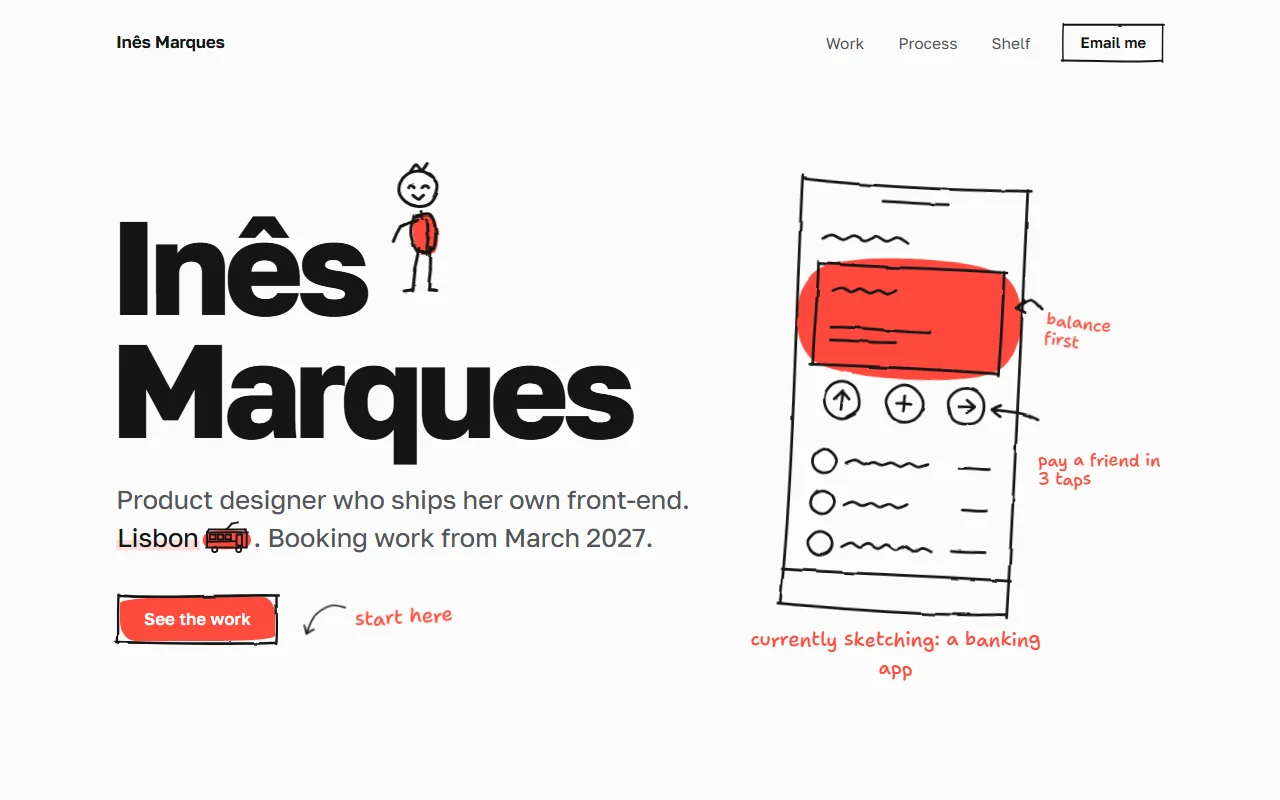
A portfolio for Inês Marques, a fictional product designer in Lisbon who ships her own front-end. Every part of the page starts as a doodle and becomes real as you scroll, the way her work goes from napkin sketch to shipped product. All the doodles are drawn in code, so they draw themselves, shimmer like hand-drawn animation, and take any words, projects and screens from one site.config.ts file.
Made for
- Product designers and design engineers who want a portfolio people remember and share
- Illustrators, UX designers and front-end developers with three or four projects to show
- Anyone whose work starts on paper and who wants the page to show it
What stands out04
- A hero where a doodled buddy writes your name by hand, then each scribbled letter flies into its typeset twin
- Words in your bio that carry their own doodles: a tram rolls in, coffee steams, a dog peeks over the line
- Projects sketched as wireframes first, then coloured in with a marker, with hand-written notes pointing at what matters
- A comic strip that draws itself, a shelf you can tap, and a curtain call of every doodle on the page
02The look
Its own palette and type
The colours and type it ships with. Tap a colour to copy it.
- AaGolos TextIncluded with the template
The quick brown fox jumps over the lazy dog
0123456789
- AaShantell SansIncluded with the template
The quick brown fox jumps over the lazy dog
0123456789
A white page with one black pen and one coral marker. Golos Text for type, Shantell Sans for hand-written notes. Every doodle, wireframe, frame and arrow is drawn in code with a seeded hand-drawn wobble, and the lines boil through one SVG filter. Headings are written by hand first and then set in type. Buttons are hand-drawn boxes; the main one is filled with marker.
03Sections
6 sections, in page order
From the first screen to the footer.
- 01
Hero
A doodled buddy writes the name with a marker; each scribbled letter flies into its typeset twin. A phone sketch of what she's working on now draws itself beside the name, with notes.
- 02
About
A short bio where chosen words carry doodles that act when read: a tram rolls in, coffee steams, a pencil scribbles, a laptop types, a dog peeks up and wags, a pigeon flaps.
- 03
Work
Each project is first a napkin wireframe drawn stroke by stroke, then the real screen is coloured in along a marker scribble, then hand-written notes with arrows land on it. Desktop and phone layouts.
- 04
Process
A four-panel comic that holds still while the buddy walks from panel to panel across the gutters, each scene drawing itself as he arrives. On phones the panels stack and draw as they scroll in.
- 05
Shelf
The owner's things on a drawn shelf. Touch them: the plant sways, the record plays notes, and the instant camera flashes and ejects a photo that develops.
- 06
Contact
A curtain call: every doodle from the page comes back for a group photo, a flash freezes it in a polaroid, and the email sits under it with a copy button.
04Make it yours
Where everything lives
Every word, project, screen, note and photo lives in site.config.ts. Tag any word in the bio with one of 21 doodles and an act. Add your own doodles in lib/doodles.ts with the hand-drawn pen. Run npm run verify:content to check images, doodles and acts.
| To change | Edit |
|---|---|
| Name, role, city, email and availability | site.config.ts → person, available |
| The sketch beside the name and its notes | site.config.ts → note, noteBits |
| Bio and the doodles on its words | site.config.ts → about.bio |
| Projects, screens and the notes on them | site.config.ts → work.projects |
| Comic panels, shelf objects and photos | site.config.ts → process, shelf |
| Ink, page and marker colours | styles/base.css |
| New doodles | lib/doodles.ts |
Run it
$ npm install$ npm run devNode.js 20.9 or newer. No environment variables.
Before you go live
Set person, about, work and contact in site.config.ts, replace the screens in public/images/work/ and the photos in public/images/shelf/, then run npm run verify:content and npm run build.
05Specifications
What’s under the hood
- sections
- 6
- source files
- 34
- lines of code
- ~3,100
- dependencies
- 3
- API keys needed
- 0
Stack
- Framework
- Next.js 16 (App Router), React 19
- Language
- TypeScript
- Styling
- CSS with design tokens and component styles
- Dependencies
nextreactreact-dom
Design
- Fonts
- Golos Text, Shantell Sans, self-hosted with next/font
- Images
- Every doodle, the buddy, wireframes, frames and arrows are drawn in code. Five sample product screens drawn for the template (a transit app, a restaurant floor plan, an invoicing app) and three sample photos for the shelf camera.
- Colour scheme
- Light
- Responsive
- Desktop, tablet and phone
Quality
- Accessibility
- Skip link, visible focus, keyboard navigation, reduced motion
- API keys and environment variables
- None
- Node.js
- 20.9 or newer
Shipping
- Deploys to
- Vercel, Netlify, Cloudflare Pages or any Node host
- Codebase
- 34 source files, about 3,100 lines
- Last updated
- Nov 20, 2026
06License
One license, no tiers
The full text ships as LICENSE.md in the download and is on the license page.
You can
- Use it for your own products
- Use it for any number of client projects
- Change the code and design however you like
- Deploy the result commercially
You can’t
- Resell or share the files as a template, theme or UI kit
- Publish the source as a template in a public repository
07Questions
Before you start
What do I get with Rough?
The complete Rough project as a download: the Next.js app, its config file, a README with setup and customisation notes, and the license. It’s free: press Get, sign in with a free account, and it’s added to your library to download. No card needed.
Can I use Rough for client projects?
Yes. The free templates use the same commercial license as the paid ones: your own products and any number of client projects, and you can change the code however you like. What you can’t do is resell or share the template files themselves as a template or UI kit.
Do I need API keys, a database or a backend?
No. It runs with npm install and npm run dev and deploys to Vercel, Netlify or Cloudflare Pages without any environment variables.
What should I change before I launch?
Set person, about, work and contact in site.config.ts, replace the screens in public/images/work/ and the photos in public/images/shelf/, then run npm run verify:content and npm run build.
Do I need to know Next.js?
Basic React helps, but most changes are text edits in site.config.ts. The README walks through colours, fonts and section order.
How do updates work?
Updates to Rough are free. When a new version ships, download it again from your account.
Why is Rough free?
So you can see the standard of every template in the library before you pay for one. Rough is complete, with nothing held back. If you want the rest, all-access is $159 for all 63 templates.
08All-access
All 63 templates for $159. And every one added later.
Every template in the library, including Rough. Same license, free updates, and less than 5 single templates would cost.
63 templates today$2.52 each
7 more and it’s $169. Buy today and every one after is yours at $159.
09More templates