Maquette: AI character studio dashboard template for Next.js.
$39one-time payment
Guest checkout · Instant zip · Commercial license · 14-day refund before download
- Next.js 16
- Tailwind CSS v4
- TypeScript
- 7 sections
- Light
- No API keys
- Palette
- Updated Nov 24, 2026
01Overview
At a glance
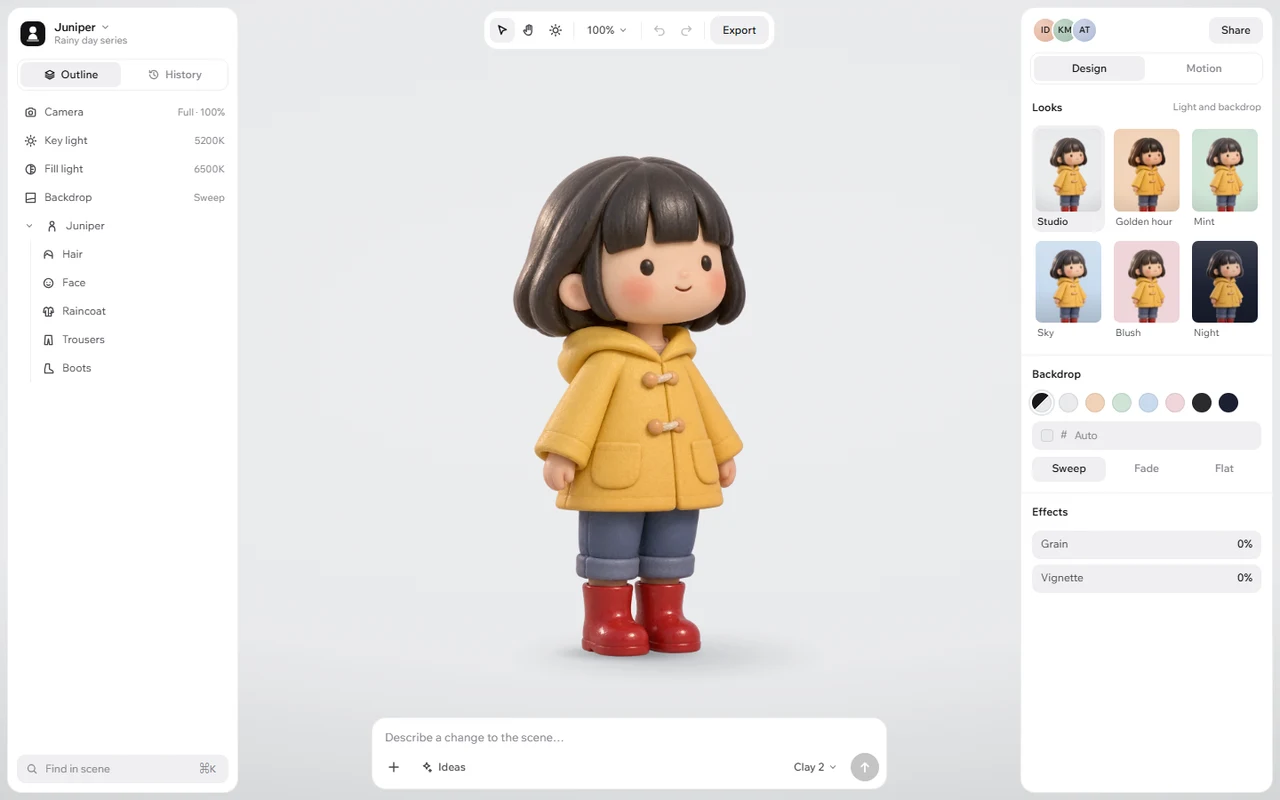
The editor screen of an AI tool for characters and scenes, for a fictional studio working on a character called Juniper: an outline of the scene and its history, the character on a live stage, a composer to ask for changes, and an inspector for light, camera, colours and motion. One swappable object answers every call, from the project and its versions to the model run.
Made for
- AI image, 3D and character tools that need an editor around their model: prompt, versions, inspector and export
- Creative apps for avatars, mascots, stickers or product shots where the result sits on a stage people light and frame
- Teams who want an editor at design-tool level, not a chat box with a picture under it
What stands out04
- A live stage: drag the key light around the figure and its light and shadow follow; click a part and a tag pins to it
- A composer that directs the scene, with steps as it runs, a reply with Undo, references, ideas and a model menu
- Looks, history, shots and motion clips shown as small live pictures of the scene, not placeholders
- Hop, sway and breathe clips with a scrubbable playhead, and PNG export in four frames at 1× or 2×
02The look
Its own palette and type
The colours and type it ships with. Tap a colour to copy it.
- AaWix Madefor TextIncluded with the template
The quick brown fox jumps over the lazy dog
0123456789
- AaRed Hat MonoIncluded with the template
The quick brown fox jumps over the lazy dog
0123456789
Light and calm, with every surface a neutral grey and the character as the only colour. Panels float over the stage, and the stage takes the scene's backdrop, so a new look tints the room. Hover, selected and current states are solid steps of grey; the one action colour is ink. Wix Madefor Text for the interface and Red Hat Mono for hex values. The key light is a gradient laid over the render in soft light with a cast shadow that falls away from it, so moving the light relights the figure. Motion only marks a change: a look eases in, the camera glides to a shot, a clip plays when you press Play.
03Sections
7 sections, in page order
From the first screen to the footer.
- 01
Stage
The character on its backdrop with a cast shadow and a contact shadow. Click a part to select it and a tag pins to it; hover to see what's under the pointer. Select the key light, or press L, and a sun handle orbits the figure: drag it and the light and shadow follow live. Zoom with ⌘ scroll or a pinch, move the view with Space and drag.
- 02
Outline and history
Camera, key and fill lights, backdrop and the character with its parts, with light switches and a shortcut to ask about any part; Find in scene (⌘K) filters it. History lists every version with a picture of it; select one to return to it, or save the current scene.
- 03
Composer
Ask for a change; a selected part scopes the prompt. Attach a reference image, a 3D model or a brief, start from an idea, and pick the model with its credit cost. While it runs a line fills along the top with the current step and Stop ends it; the reply lands above with Undo and the result is filed as a version.
- 04
Design inspector
Follows the selection: six looks as small pictures of the scene, the backdrop's colour and style, grain and vignette; a light's direction ball, intensity, colour temperature and the shadow; the camera's shots and zoom; the character's colours (pick one to ask for it) and its finish.
- 05
Motion
Still, Breathe, Hop and Sway clips, each shown at its telling moment. Play and pause with P, scrub the playhead, set the loop to 2, 4 or 8 seconds and the speed; the shadow shrinks as the figure leaves the ground.
- 06
Export and share
A PNG drawn from the scene in 4:5, 1:1, 16:9 or as a transparent cut-out, at 1× or 2×, with a preview. Share invites by email as editor or viewer and copies the scene's link.
- 07
App frame
Toolbar with tools, zoom and shots, undo and redo; a scene menu with light, dark and system themes; keyboard shortcuts for every tool. On phones the stage takes the screen and Outline, Design and Motion open as sheets.
04Make it yours
Where everything lives
Every screen goes through one object in lib/studio/index.ts: the project and its character render, versions, credits, the model run and invites. It runs on a demo studio whose stand-in model reads prompts for light, backdrop, framing, shadow and motion, until you point it at your own backend and model.
| To change | Edit |
|---|---|
| Product name, signed-in person, team, models and costs, prompt ideas | site.config.ts |
| The project, versions, the model run and invites | lib/studio/index.ts |
| Looks, shots, clips, backdrop colours and how light is painted | lib/scene.ts |
| Surfaces, greys, inks, radii and type | app/globals.css, app/layout.tsx |
| Buttons, menus, popovers, scrub fields and the dialog | components/ui.tsx |
| Motion curves | components/stage/motion.ts |
| Export frames and drawing | components/editor/exporter.ts |
Run it
$ npm install$ npm run devNode.js 20.9 or newer. No environment variables.
Before you go live
Point studio in lib/studio/index.ts at your own backend and model and delete the demo, return your character's render from project(), and put your product, team and models in site.config.ts.
05Specifications
What’s under the hood
- sections
- 7
- source files
- 37
- lines of code
- ~4,400
- dependencies
- 3
- API keys needed
- 0
Stack
- Framework
- Next.js 16 (App Router), React 19
- Language
- TypeScript
- Styling
- Tailwind CSS v4 with design tokens and component styles
- Dependencies
nextreactreact-dom
Design
- Fonts
- Wix Madefor Text, Red Hat Mono, self-hosted with next/font
- Images
- One character render on a transparent background (the demo's Juniper, made for the template). The light, shadows, backdrops, thumbnails and export are drawn in CSS and Canvas from the scene.
- Colour scheme
- Light
- Responsive
- Desktop, tablet and phone
Quality
- Accessibility
- Skip link, visible focus, keyboard navigation, reduced motion
- API keys and environment variables
- None
- Node.js
- 20.9 or newer
Shipping
- Deploys to
- Vercel, Netlify, Cloudflare Pages or any Node host
- Codebase
- 37 source files, about 4,400 lines
- Last updated
- Nov 24, 2026
06License
One license, no tiers
The full text ships as LICENSE.md in the download and is on the license page.
You can
- Use it for your own products
- Use it for any number of client projects
- Change the code and design however you like
- Deploy the result commercially
You can’t
- Resell or share the files as a template, theme or UI kit
- Publish the source as a template in a public repository
07Questions
Before you buy
What do I get when I buy Maquette?
The complete Maquette project as a download: the Next.js app, its config file, a README with setup and customisation notes, and the license. It’s added to your account’s library the moment payment goes through.
Can I use Maquette for client projects?
Yes. One purchase covers your own products and any number of client projects, and you can change the code however you like. What you can’t do is resell or share the template files themselves as a template or UI kit.
Do I need API keys, a database or a backend?
No. It runs with npm install and npm run dev and deploys to Vercel, Netlify or Cloudflare Pages without any environment variables.
What should I change before I launch?
Point studio in lib/studio/index.ts at your own backend and model and delete the demo, return your character's render from project(), and put your product, team and models in site.config.ts.
Do I need to know Next.js?
Basic React helps, but most changes are text edits in site.config.ts. The README walks through colours, fonts and section order.
How do updates work?
Updates to Maquette are free. When a new version ships, download it again from your library.
Can I get a refund?
Before you download it, yes: email support@hairlineui.com within 14 days and you get your money back, no reason needed. After you download, if Maquette doesn’t work as described, we fix it, and if we can’t, we refund it. A change of mind after downloading isn’t refunded, because you keep the code, so try the live demo first: it’s the whole template.
Should I buy all-access instead?
If you’ll use 5 or more templates, yes. All-access is $159 for all 64 templates, including Maquette and every template added later; 5 single templates would cost $195. The price rises as the library grows: 6 more templates and it goes to $169.
08All-access
All 64 templates for $159. And every one added later.
Every template in the library, including Maquette. Same license, free updates, and less than 5 single templates would cost.
64 templates today$2.48 each
6 more and it’s $169. Buy today and every one after is yours at $159.
09More templates